
因 Docsify 部署的局限性,我们的文档库尝试使用不同的框架。 现在准备使用 vitepress,在这之前最后看看曾经部署过好几年的文档库吧。 好处感觉就是 Docsify 默认涉及内容能够全屏显示。 https://www.isharkfly.com/t/docsify/17169

可以把下面的代码添加到 vitepress 的 head 上来让 vitepress 网站使用 GTM。 例如,我们的内容是: head: [ [ 'script', {}, `(function(w,d,s,l,i){w[l]=w[l]||[];w[l].push({'gtm.start': new Date().getTime(),event:'gtm.js'});var f=d.getElementsByTagName(s)[0], j=d.createElement(s),dl=l!='dataLayer'?'&l='+l:'';j.async=true;j.src= 'https://www.googletagmanager.com/gtm.js?id='+i+dl;f.parentNode.insertBefore(j,f); })(window,document,'script','dataLayer','GTM-W3NL9V');` ] ], 随后重新部署下即可。 https://www.isharkfly.com/t/vitepress-gtm/17170

Vitepress 在默认情况下,将会搜索与 .vitepress 同级目录下的所有 md 文件然后进行转换。 如果想使用不同的目录的话,那么就需要参数: .srcDir: './src', 这样就可以把所有文件移动到 src 目录下了。 当完成上面的配置后,Vitepress 将会扫描 src 目录下的内容了。 https://www.isharkfly.com/t/vitepress/17171

构建的错误信息如下: 09:52:57.975 ➤ YN0000: · Done with warnings in 3s 120ms 09:52:58.072 Executing user command: npm run build 09:52:58.817 npm ERR! Missing script: "build" 09:52:58.818 npm ERR! 09:52:58.818 npm ERR! To see a list of scripts, run: 09:52:58.818 npm ERR! npm run 09:52:58.818 09:52:58.819 npm ERR! A complete log of this run can be found in: /opt/buildhome/.npm/_logs/2025-04-10T13_52_58_752Z-debug-0.log 09:52:58.825 Failed: Error while executing user command. Exited with error code: 1 问题和解决 上面的问题是在执行构建的时候 VitePress 的构建命令不是 npm run build。 这个构建命令需要改成:npm run docs:build 在 cloudflare page 中选择构建配置。 然后单击编辑按钮, 有 2 个地方要修改。 一个是构建的命令,一个是构建完成后输出文件夹的路径。 如果dist 文件夹的路径不修改,后面会提示部署找不到需要部署的文件。 https://www.isharkfly.com/t/vitepress-cloudflare-page-npm-run-build/17166

提示的构建错误信息为: 09:35:29.838 Error: Exit with error code: 1 09:35:29.839 at ChildProcess.<anonymous> (/snapshot/dist/run-build.js) 09:35:29.839 at Object.onceWrapper (node:events:652:26) 09:35:29.839 at ChildProcess.emit (node:events:537:28) 09:35:29.840 at ChildProcess._handle.onexit (node:internal/child_process:291:12) 09:35:29.847 Failed: build command exited with code: 1 原因和解决 提示上面错误信息的原因是 Yarn 的版本问题。 在默认 NodeJS 的安装情况下,Yarn 会安装 1.22 的版本。 但在cloudflare 构建中,默认会使用 Yarn 3 的版本。 在日志的最上部分,提示了安装 Yarn 的版本信息。 09:35:26.187 No wrangler.toml file found. Continuing. 09:35:26.253 Detected the following tools from environment: yarn@3.6.3, nodejs@18.17.1 因此解决办法就是针对 VitePress 项目指定使用 yarn 的版本。 运行命令来进行升级: yarn set version stable 控制台输出: PS D:\WorkDir\iSharkFly\iSharkFly-Cn\docs-hn> yarn set version stable ➤ YN0000: Downloading https://repo.yarnpkg.com/4.9.1/packages/yarnpkg-cli/bin/yarn.js ➤ YN0000: Saving the new release in .yarn/releases/yarn-4.9.1.cjs ➤ YN0000: Done in 0s 195ms PS D:\WorkDir\iSharkFly\iSharkFly-Cn\docs-hn> yarn -v 4.9.1 PS D:\WorkDir\iSharkFly\iSharkFly-Cn\docs-hn> 随后推送,重新部署即可。 https://www.isharkfly.com/t/vitepress-cloudflare-page-node/17165

CloudFlare Page 能够对前端项目进行构建。 他们能支持从 GitHub 上直接拉取代码。 如果 GitHub 上的代码仓库不存在的话,首先需要创建一个连接才可以。 随后会要求登录 GitHub,然后可以在希望访问的组织中进行选择。 随后同意访问赋予权限即可。 https://www.isharkfly.com/t/cloudflare-page-github/17164

一眨眼,微软 50 年了。 Edge 可以换个皮肤。 https://www.isharkfly.com/t/50-edge/1541

Ubuntu 的防火墙配置可以参考文章:Firewall - Ubuntu Server documentation 22 端口 需要注意的是,在启动防火墙之前,需要先开放 22 端口。 否则 SSH 将会拒绝你连接防火墙。 开放 22 端口的命令为:sudo ufw allow 22 添加端口 如果还希望添加其他端口。 可以使用命令:sudo ufw allow 8161 来逐次添加。 关闭端口 如果想关闭特定的端口,使用命令:sudo ufw deny 22 启动服务 sudo ufw enable 命令是用来启动服务的。 关闭服务 sudo ufw deny 22 命令用来关闭服务。 这是因为有时候我们可能需要暂时关闭防火墙来确定是不是网络配置问题。 最后,可能还需要使用状态查看命令来看看开放的端口情况。 https://www.isharkfly.com/t/ubuntu/13527
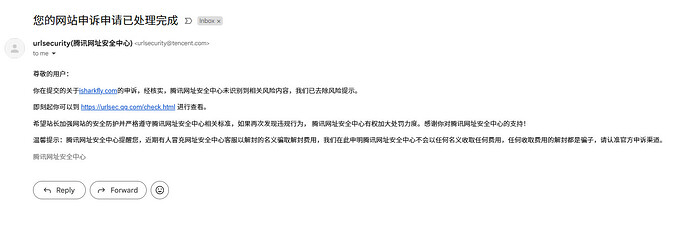
我们的网站:www.isharkfly.com 不知道为什么突然被腾讯标记为不安全内容网站。 主要是因为在我们的公众号中添加了外部链接。 申诉没多久就解封了。 至少知道,腾讯针对外部链接会有日常检查机制的。 或者我们被人给投诉了? https://www.isharkfly.com/t/topic/13608/1

想占领我的右键就算了,还想占领我播放器的配置。 Plex 播放的时候提示投屏,结果是迅雷。 单击任何链接提示下载迅雷。 原因 就算卸载了迅雷,这个问题还存在。 这是因为迅雷悄悄的在浏览器中装插件。 就是这么无耻,需要从浏览器中的插件扩展中删掉。 连 Edge 都没有放过。 只要你安装浏览器他都给你丢上插件。 https://www.isharkfly.com/t/topic/14078/2