开发工具分享
  • 首页
  • 计算科学
  • 文化旅游
  • 项目和网站
    • OSSEZ 计算技术
    • USRealEstate 社区
    • 地区文化
    • CWIKI.US
    • BUG.OSSEZ.COM
    • RSS.OSSEZ.COM
CWIKIUS.CN
一个有独立思考和温度的清新站
  1. Home
  2. Computer Science
  3. This article

如何使用 Apache Directory Studio 连接 JumpCloud

2020年09月30日 963Browse 0Like 0Comments

JumpCloud 是一个基于云的 LDAP 服务。

如果你的项目小组成员在 10 个或者 10 个以下的话,你可以免费使用 JumpCloud 服务器。

这篇文章假设的是你已经设置好了 JumpCloud 的云服务,并且已经注册了 JumpCloud 的管理员和后台访问权限。同时你希望使用 Apache Directory Studio 来连接 JumpCloud 提供的云 LDAP 服务。

登录 JumpCloud 的管理员后台

管理员后台的地址为:https://console.jumpcloud.com/login

在这里你需要输入你管理员的账号和密码,如果你是用户的话,你需要使用你用户的账号和密码在用户前端进行登录。
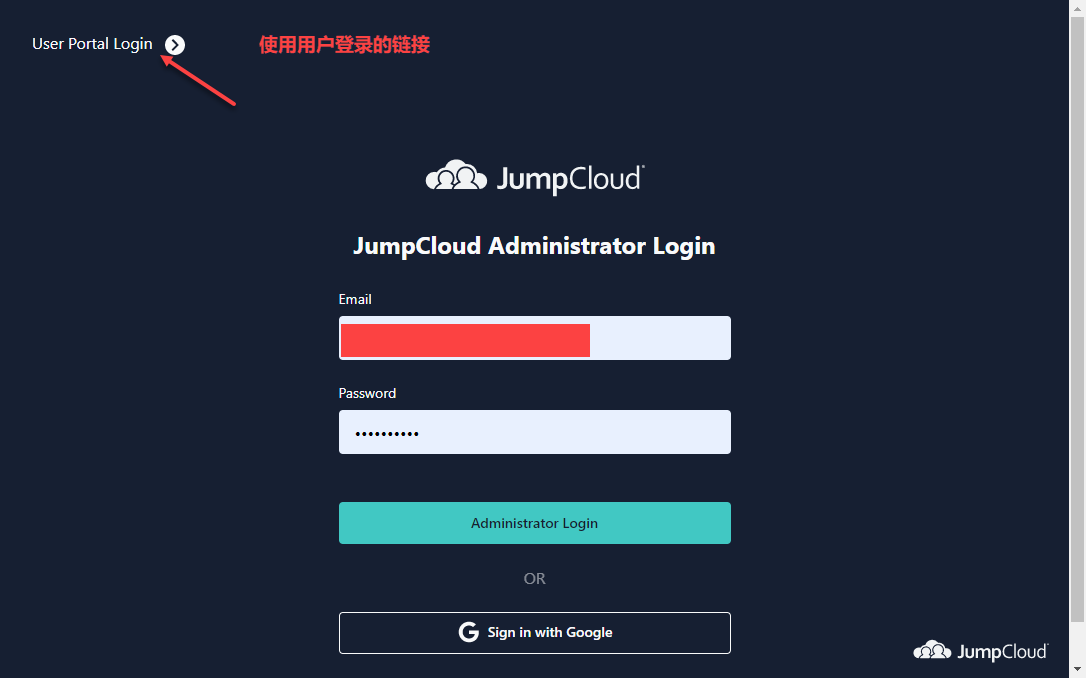
 

JumpCloud-ad-01


登录成功后,你可以看到所有的用户列表。

如果是管理员的话,你可以选择你管理员的用户名称。
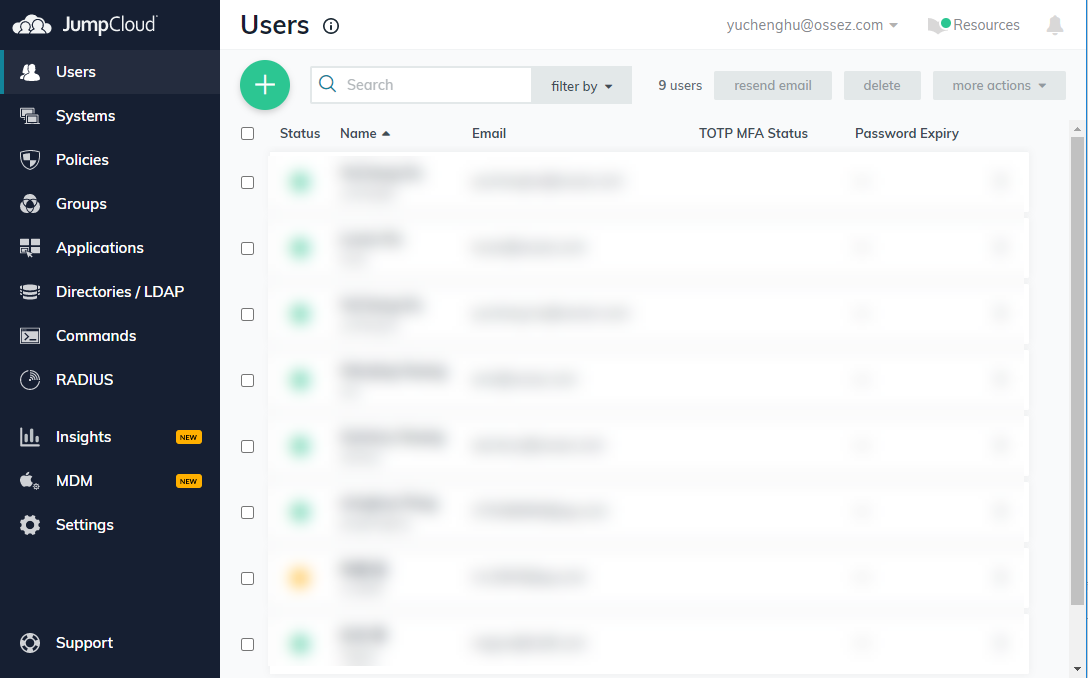
 

JumpCloud-ad-02


然后找到 LDAP 的 DN 名称。

这个就是你 JumpCloud 管理员的 DN,你需要将这一长串字符串拷贝下来。
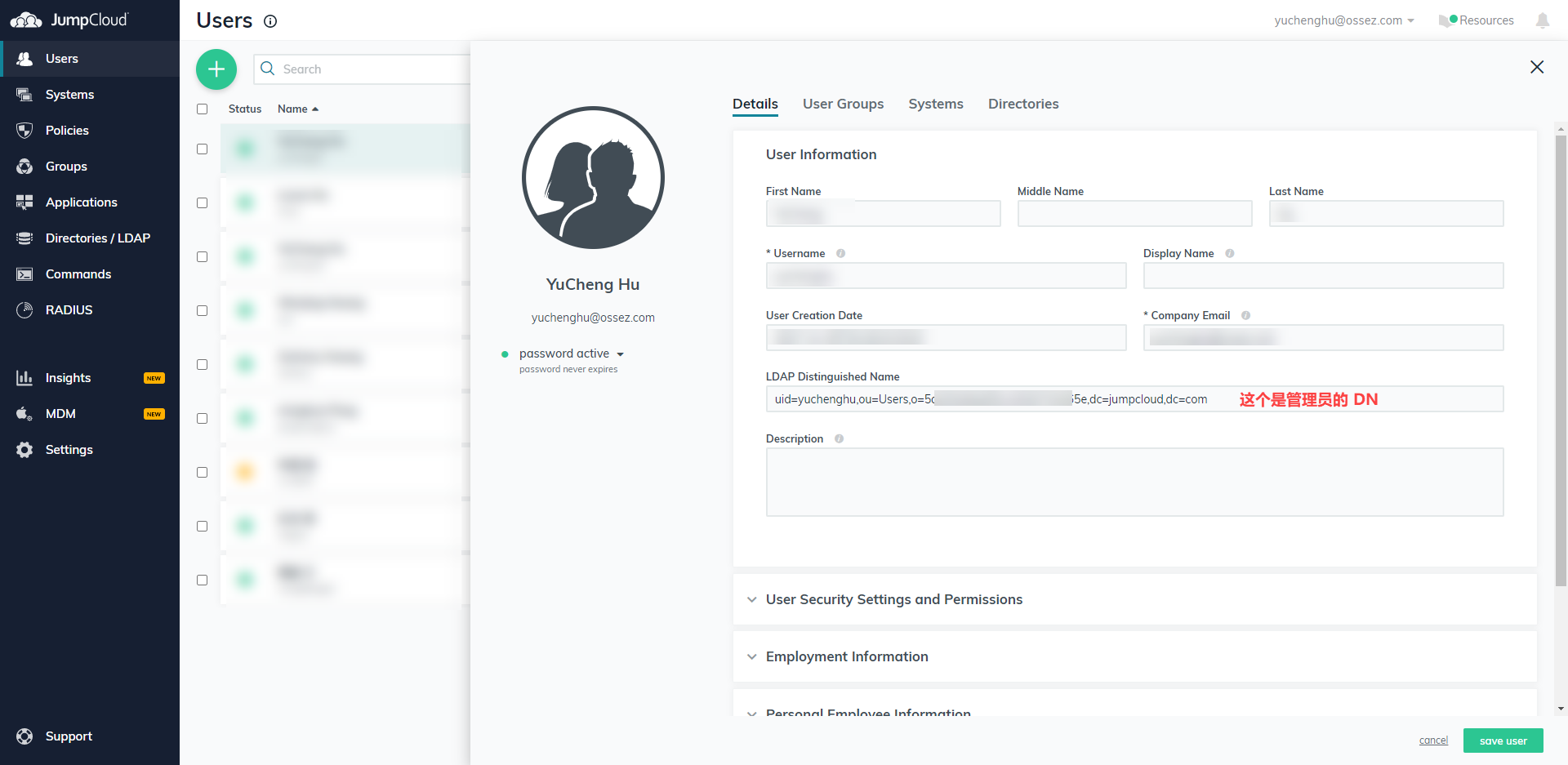
 

JumpCloud-ad-03


在你使用 Apache Directory Studio 进行登录的时候,你需要这个 DN 才能够进行登录。

Apache Directory Studio 创建连接

登录 Apache Directory Studio ,然后可以在左侧的下面配置连接。
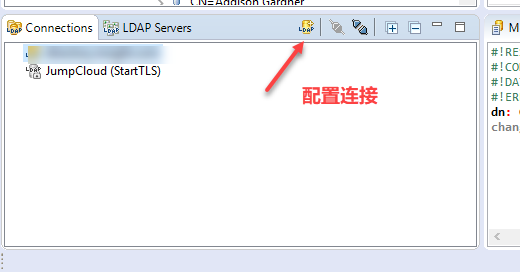
JumpCloud-ad-04

配置 JumpCloud 的网络参数。
Hostname: ldap.jumpcloud.com
Port: 389

然后可以检查网络参数。


JumpCloud-ad-05


配置 JumpCloud 的授权
在 DN 粘贴上面我们提到的需要你保存的 DN。

在密码部分输入你登录 JumpCloud 控制台的密码。

在配置完成后,可以单击检查授权来查看你的用户信息是否正确。
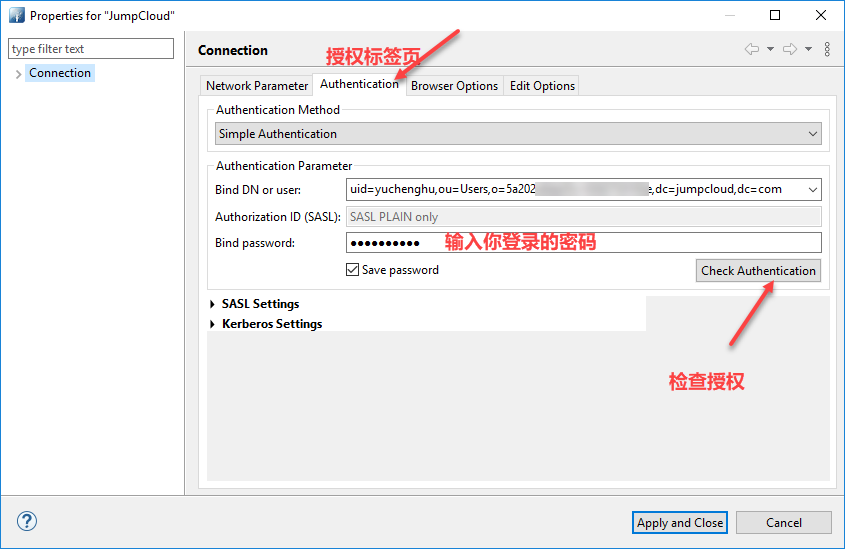
 

JumpCloud-ad-06


如果你的配置是正确的话,你将会看到授权已经成功的提示,这个时候你就可以应用并且关闭连接配置界面了。
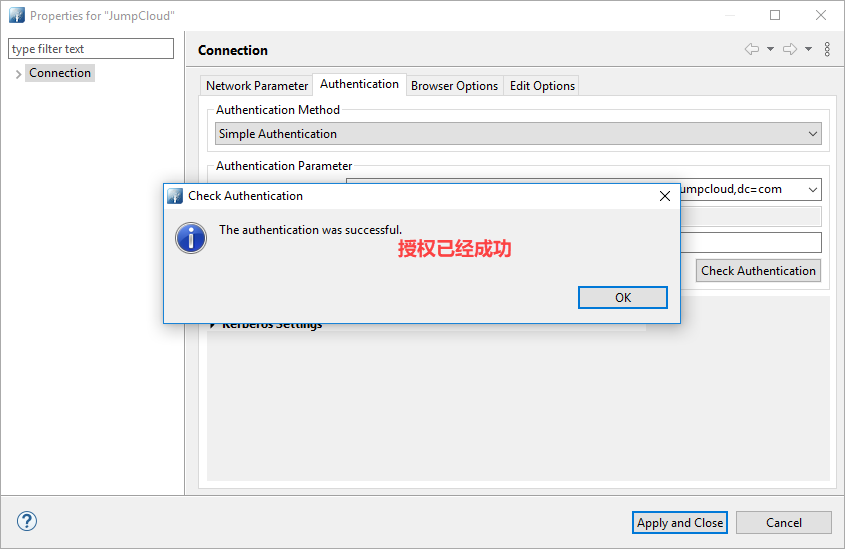
 

JumpCloud-ad-07


浏览目录

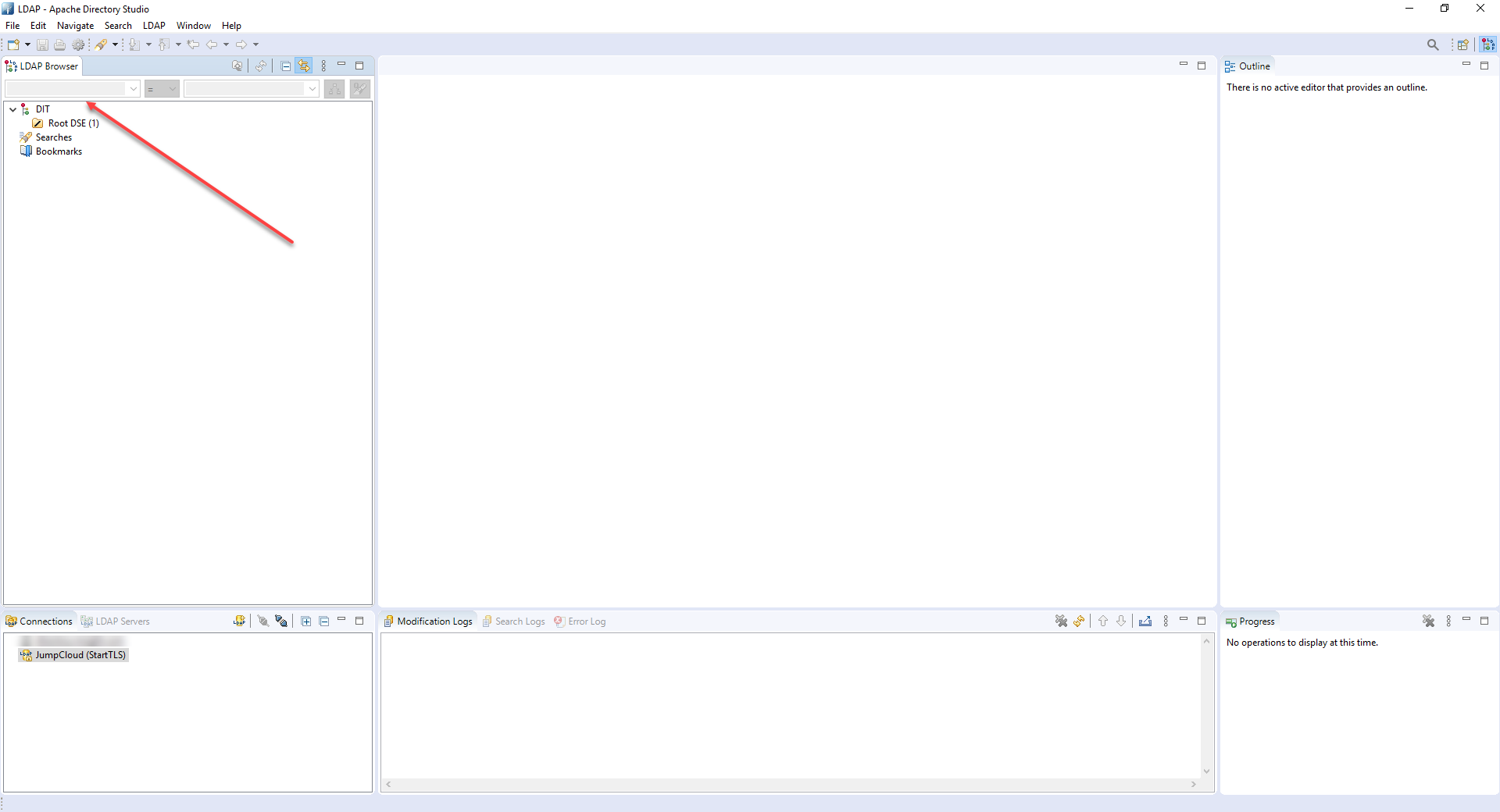
在右下角双击连接,然后将会在左上显示一个 DIT。


JumpCloud-ad-08


如果你双击 DIT 的话,你可能看不到任何你存储到 JumpCloud 上面的用户,这是因为你 DN 的 Base DN 路径不正确。

其实也不能说不正确,因为你的用户授权的 CN 比较低,你需要返回到上一级。

右键,然后在弹出的对话框中选择 Go to Dn
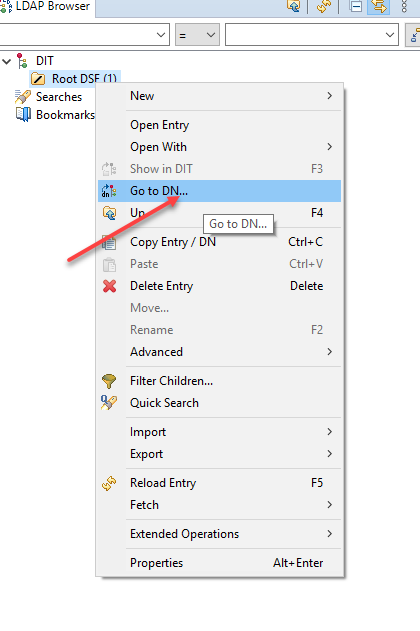
 

JumpCloud-ad-09 (1)


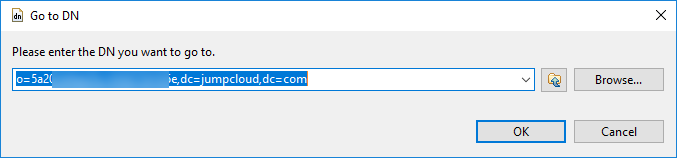
然后在弹出的对话框中输入:

o=*********************,dc=jumpcloud,dc=com
JumpCloud-ad-10

其实就是在上面拷贝的 DN,但是这个 DN 需要去掉 cn 部分的内容。

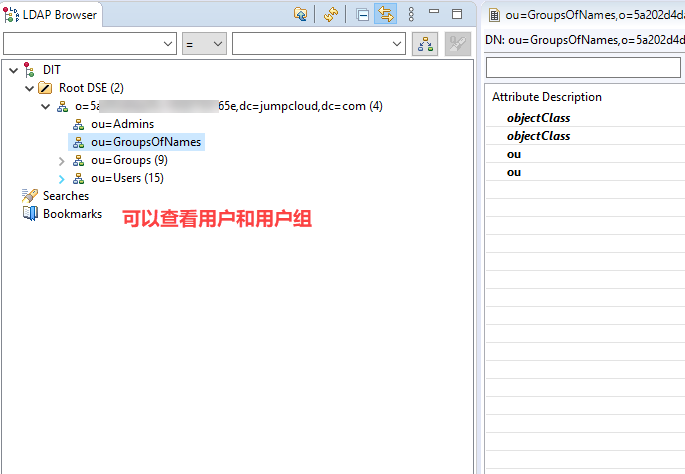
这个操作的目的就是在授权成功后,返回到 上一级的 DN,因为你的用户和用户组信息都会在上一级的 DN 上面。

然后你就可以在这里查看用户和用户组的信息了。
JumpCloud-ad-11

这里能够查看到的信息应该是与 JumpCloud 上面配置的用户和用户组信息对应的。

至此,你的 Apache Directory Studio 和 JumpCloud 就已经完全配置成功并且建立连接了。


https://www.ossez.com/t/apache-directory-studio-jumpcloud/527

Tags: None
Last updated:2020年09月30日

HoneyMoose

有温度的人文和独立的思考

Like
< Previous
Next >

Comments

Cancel reply

Archives
  • May 2026
  • April 2026
  • March 2026
  • February 2026
  • January 2026
  • December 2025
  • November 2025
  • October 2025
  • September 2025
  • August 2025
  • July 2025
  • June 2025
  • May 2025
  • April 2025
  • March 2025
  • February 2025
  • January 2025
  • December 2024
  • November 2024
  • October 2024
  • September 2024
  • August 2024
  • July 2024
  • June 2024
  • May 2024
  • April 2024
  • March 2024
  • February 2024
  • January 2024
  • December 2023
  • November 2023
  • October 2023
  • September 2023
  • August 2023
  • July 2023
  • June 2023
  • May 2023
  • April 2023
  • December 2022
  • November 2022
  • October 2022
  • September 2022
  • August 2022
  • May 2022
  • April 2022
  • March 2022
  • February 2022
  • January 2022
  • December 2021
  • November 2021
  • October 2021
  • September 2021
  • August 2021
  • July 2021
  • June 2021
  • May 2021
  • April 2021
  • March 2021
  • February 2021
  • January 2021
  • December 2020
  • November 2020
  • October 2020
  • September 2020
  • August 2020
  • July 2020
  • June 2020
  • May 2020
  • April 2020
  • March 2020
  • February 2020
  • January 2020
  • December 2019
  • November 2019
  • October 2019
  • September 2019
  • August 2019
  • July 2019
  • June 2019
  • May 2019
  • April 2019
  • March 2019
  • February 2019
  • January 2019
  • December 2018
  • November 2018
  • October 2018
  • September 2018
  • August 2018
  • July 2018
  • June 2018
  • May 2018
  • April 2018
  • March 2018
Categories
  • Computer Science (2,362)
    • Confluence (663)
    • Gradle (12)
  • U.S. (482)
  • 文化旅游 (145)

COPYRIGHT © 2020 CWIKIUS. ALL RIGHTS RESERVED.

THEME KRATOS MADE BY VTROIS

湘ICP备2020018253号-1