开发工具分享
  • 首页
  • 计算科学
  • 文化旅游
  • 项目和网站
    • OSSEZ 计算技术
    • USRealEstate 社区
    • 地区文化
    • CWIKI.US
    • BUG.OSSEZ.COM
    • RSS.OSSEZ.COM
CWIKIUS.CN
一个有独立思考和温度的清新站
  1. Home
  2. Computer Science
  3. This article

Spring Boot API 的 Controller 如何获得发送的 JSON 数据

2021年01月27日 518Browse 0Like 0Comments

我们知道可以发送 JSON 数据到 API 上面。

通常我们都会使用 POST 方法,在实际编程的时候我们应该如何获得发送的 JSON 数据呢?

Controller 获得 JSON 数据

在客户端通过 API 发送 JSON 数据到 Controller 的时候,我们可以在 Controller 使用 RequestBody 注解来获得 JSON 数据。

考察下面的代码:

    /**
     * Search Question Index
     *
     * @return
     */
    @PostMapping("/sold")
    public ResponseEntity<?> searchUser(@RequestBody RealEstateRequest realEstateRequest) {

        logger.debug("realEstateRequest - {}" , realEstateRequest.getPropertyTown());

        REListing reListing=  listingService.getREListingById();

        return new ResponseEntity<REListing>(reListing, HttpStatus.OK);
    }


api-json-01


在 API 获得 JSON 数据后,将会尝试将 JSON 数据的内容设置到对象 RealEstateRequest 中。

所以,我们还需要在代码中定义一个对象 RealEstateRequest。

RealEstateRequest 对象的代码如下,在下面的代码中,我们省下了上面需要导入的 package 等

public class RealEstateRequest implements Serializable {
    private static final long serialVersionUID = 6474765081240948885L;


    private String propertyTown;

    public String getPropertyTown() {
        return propertyTown;
    }

    public void setPropertyTown(String propertyTown) {
        this.propertyTown = propertyTown;
    }
}

在这里需要注意的是,为了能够设置正确的值到对象中,你 propertyTown 的这个变量需要和 JSON 对象中的变量相同。

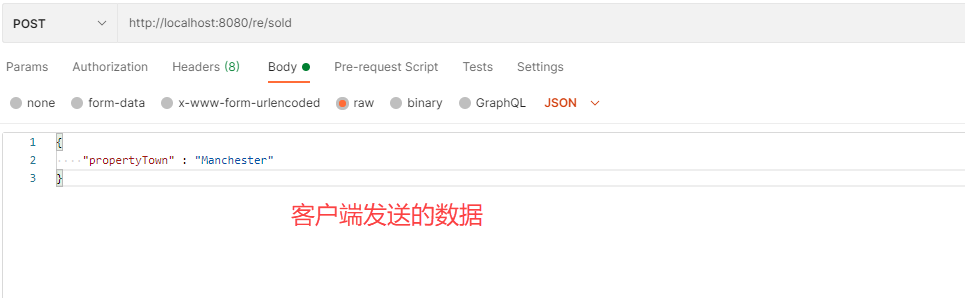
所以你的 JSON 测试数据应该为:

{

    "propertyTown" : "Manchester"

}

通过 API 查看对象,你会看到从客户端传递的 JSON 数据已经被设置为正常的数据了。
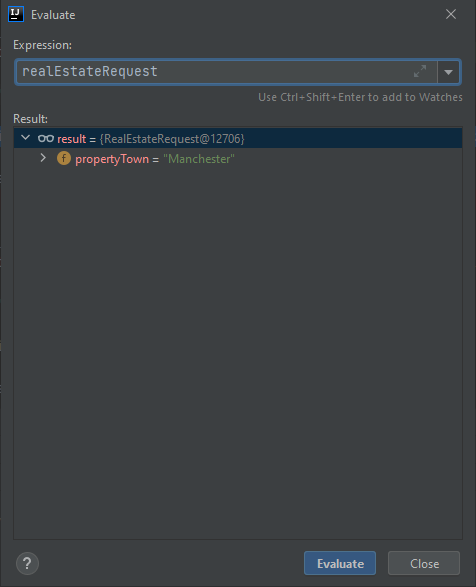
 

api-json-02


POSTMAN 从客户端发送的数据如下:


api-json-03


JSON 数据字段名

在上面的示例中,我们定义的一个 JSON 字段名为:propertyTown。

如果不做任何设置的话,你的对象是需要使用与这个字段名完全相同的名字才能获得需要的数据的,有时候我们可能不希望这样。我们希望使用不同的名字,例如我们希望设置字段名为:property_town,但是我们还是希望 propertyTown 变量能够获得值。

这个时候你就需要使用:JsonProperty 注解了。

可以在定义的对象中使用 @JsonProperty(“property_town”) 注解。

原因是 RequestBody 使用 jackson 来映射对象的,所以 JsonProperty 这个是 jackson 的注解,主要告诉 jackson 来如何对字段中的数据来进行映射。

在完成上面的修改后,你的 JSON 数据应该是如下的:
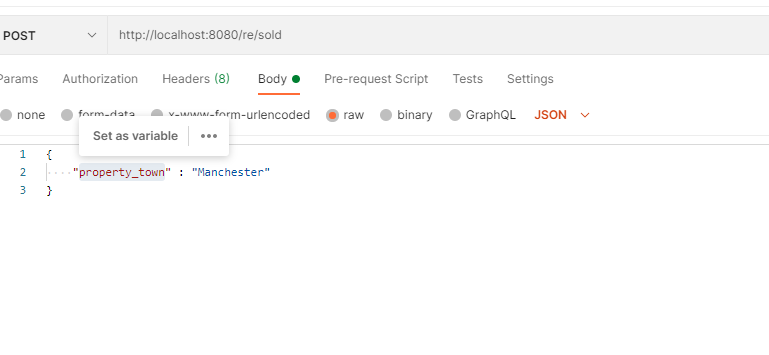
 

api-json-05


然后再对 API 进行测试,你会看到 propertyTown 也能够设置上你传递的参数。


https://www.ossez.com/t/spring-boot-api-controller-json/13217

Tags: None
Last updated:2021年01月27日

HoneyMoose

有温度的人文和独立的思考

Like
< Previous
Next >

Comments

Cancel reply

Archives
  • May 2026
  • April 2026
  • March 2026
  • February 2026
  • January 2026
  • December 2025
  • November 2025
  • October 2025
  • September 2025
  • August 2025
  • July 2025
  • June 2025
  • May 2025
  • April 2025
  • March 2025
  • February 2025
  • January 2025
  • December 2024
  • November 2024
  • October 2024
  • September 2024
  • August 2024
  • July 2024
  • June 2024
  • May 2024
  • April 2024
  • March 2024
  • February 2024
  • January 2024
  • December 2023
  • November 2023
  • October 2023
  • September 2023
  • August 2023
  • July 2023
  • June 2023
  • May 2023
  • April 2023
  • December 2022
  • November 2022
  • October 2022
  • September 2022
  • August 2022
  • May 2022
  • April 2022
  • March 2022
  • February 2022
  • January 2022
  • December 2021
  • November 2021
  • October 2021
  • September 2021
  • August 2021
  • July 2021
  • June 2021
  • May 2021
  • April 2021
  • March 2021
  • February 2021
  • January 2021
  • December 2020
  • November 2020
  • October 2020
  • September 2020
  • August 2020
  • July 2020
  • June 2020
  • May 2020
  • April 2020
  • March 2020
  • February 2020
  • January 2020
  • December 2019
  • November 2019
  • October 2019
  • September 2019
  • August 2019
  • July 2019
  • June 2019
  • May 2019
  • April 2019
  • March 2019
  • February 2019
  • January 2019
  • December 2018
  • November 2018
  • October 2018
  • September 2018
  • August 2018
  • July 2018
  • June 2018
  • May 2018
  • April 2018
  • March 2018
Categories
  • Computer Science (2,362)
    • Confluence (663)
    • Gradle (12)
  • U.S. (482)
  • 文化旅游 (145)

COPYRIGHT © 2020 CWIKIUS. ALL RIGHTS RESERVED.

THEME KRATOS MADE BY VTROIS

湘ICP备2020018253号-1