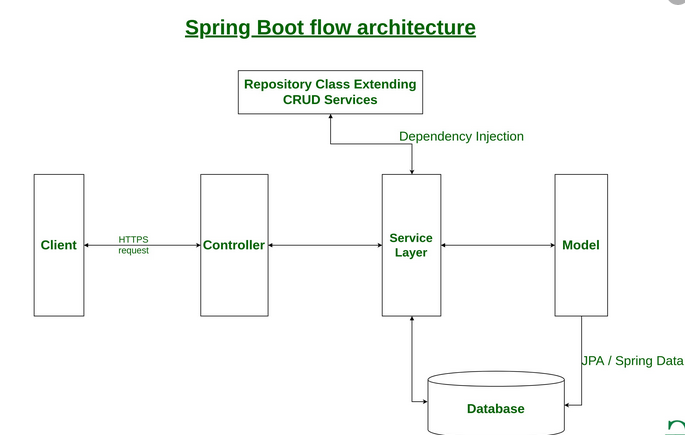
如果你现在正在开始使用 Spring Boot,或者有关 “Spring” 的相关内容,建议你开始阅读本中有关的内容。 这个通常能够回答你有关一些的基本知识,包括有"什么是(what?)", “如何开始(how?)” and “为什么(why?)” 等有关的问题。 这个部分包括有对 Spring Boot 的介绍,以及包括有安装的指南。 我们将会和你一起构建你的第一个 Spring Boot 应用程序,然后讨论一些我们需要了解的核心概念。 Spring Boot 介绍 Spring Boot 能够帮助你创建独立运行(stand-alone),基于 Spring 可在生产环境(production-grade)中运行的应用。 在 Spring 官方的文档中对 Spring 平台和使用的一些第三方类库进行了一些说明描述,因此你可以使用这些只是能够在很短的时间内开始使用 Spring Boot。 绝大部分的 Spring Boot 应用只需要一些很少的 Spring 配置就可以运行了。 你可以使用 Spring Boot 来创建一个 Java 应用程序,这个 Java 应用程序可以使用 java -jar 来运行,同时也可以使用传统的 Web 部署(war deployments)。 我们同时也提供了一个命令行工具来运行 “spring scripts”。 我们主要的目的是: 针对所有的 Spring 开发提供了一个广泛的快速和开始使用经验。 因为开始默认需求和实际的开发有所出入,我们提供了开箱即用的能够,能够让你更快的适应你的业务。 针对很多项目都需要的通用要求,我们也提供了一个广泛的非功能性特性(例如,嵌入式服务,安全性,矩阵,系统健康检查和外部扩展功能)。 你完全可以不需要使用代码生成功能,也不需要对 XML 进行配置。 以上是有关 Spring Boot 的一个简短介绍。 https://www.ossez.com/t/spring-boot/798
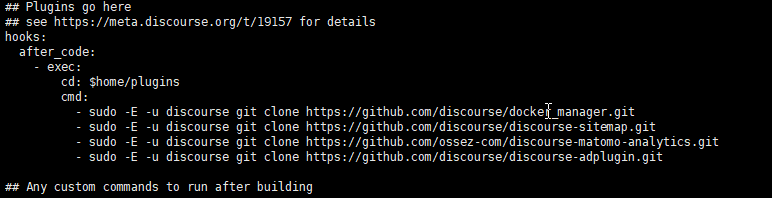
在使用 Discourse 进行服务的时候,很多人可能会希望安装一些广告服务。 对 Discourse 的广告服务来说还是可以的,因为广告服务的位置不是非常影响阅读。 这篇文章将会描述如何在 Discourse 中提供广告服务。 安装插件 Discourse 的 Google Adsense 广告服务是使用插件进行安装的。 安装插件的方法,请参考: Install Plugins in Discourse - admins - Discourse Meta 页面中的内容。 有关启用广告服务的文章,请参考页面:Official Advertising / Ad Plugin for Discourse - plugin - Discourse Meta 中的内容。 广告服务的源代码,请参考: GitHub - discourse/discourse-adplugin: Official Discourse Advertising Plugin. Install & Start Serving Ads on Your Discourse Forum 代码仓库。 安装代码 根据提示,你首先需要添加插件代码,然后对 Discourse 进行重编译。 编辑 app.yml 文件,如果你有多个仓库,你可以进行添加在下面。 如下: sudo -E -u discourse git clone https://github.com/discourse/discourse-adplugin.git 添加后进行保存。 然后依次运行下面的命令,对插件进行重编译: cd /var/discourse ./launcher rebuild app 这个编译需要一些时间,你需要耐心等待编译的完成。 必要的话,你可以重新启动你的 Docker 的容器。 启动的命令为: systemctl restart docker 确定安装 通过管理员控制台查看插件。 以编译确定你的插件已经被安装了。 通过上面安装的插件,你应该可以在插件部分找到已经安装的 ad 插件。 然后单击 插件右侧的设置。 可以进入到插件的配置界面中。 在插件的配置界面中,你需要对上面的一些插件配置进行配置。 需要配置的参数为: adsense publisher code 和 adsense topic list top code 这 2 个参数可以从你google Adsense 中找到。 登录 Google Adsense 账号,从左侧选项 Ads 下面的 Overview,然后选择你的广告中的 By ad Unit。 在这里,你可以看到所有你安装的广告列表。 然后选择一个你的广告。不建议选择固定格式的,建议选择 Responsive 格式的。 然后可以选择查看代码。 在查看的代码中你可以看到 data-ad-client 和 data-ad-slot 参数,这个 2 个参数就是你需要的值。 Discourse 中的 adsense publisher code 使用的是你代码中 ca-pub 开头的配置,在这里不需要输入 ca-pub-,你只需要输入这个配置后面的数字就可以了。 Discourse 中的 adsense topic list top code 使用的是你代码中 data-ad-slot 中配置参数后面的数字。 在这里,需要注意的是这 2 个字段都需要输入的是数字。 保存后再次访问 Discourse 网站。 广告被屏蔽 广告有可能被 Discourse 的安全配置所屏蔽而导致你没有办法进行查看。 在 Discourse 中搜索关键字 CSP ,然后选择安全。 你需要启用 CSP,同时还需要将 https 添加到你的安全选项中。 上图显示的是需要修改的安全选项。 下图显示的是修改安全选项的路径。 这个安全选项是在设置中的安全选项下面。 这个页面比较长,你需要拖动到页面中才可以看到。 校验安装 使用不同的浏览器或者清理掉当前浏览器的缓存后再次访问你的 Discourse 网站。 如果你能够看到你广告的展现,则说明配置已经成功了。 通过上面的配置我们已经可以看到展现的内容了。 如果你想取消广告,你可以将上上面的配置恢复默认,不输入上面提到的 2 个配置就可以禁用广告了。 https://www.ossez.com/t/discourse-google-adsense/796
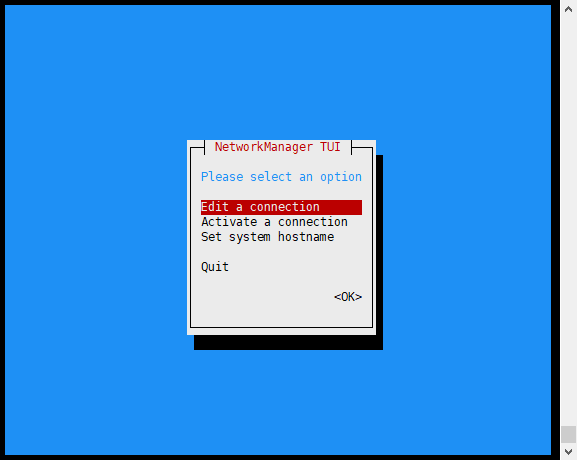
要配置网络主机名,可以使用使用命令 nmtui 进行配置。 安装 在进行配置之前需要安装包: NetworkManager-tui 使用命令: sudo dnf install NetworkManager-tui 来进行安装。 运行配置 然后运行 nmtui 命令来进行安装。 然后可以设置系统的主机名。 然后保存退出即可。 为了使用配置生效,你需要重启服务器。 https://www.ossez.com/t/centos-8/795
在使用 Discourse 进行服务的时候,很多人可能会希望安装一些广告服务。 对 Discourse 的广告服务来说还是可以的,因为广告服务的位置不是非常影响阅读。 这篇文章将会描述如何在 Discourse 中提供广告服务。 安装插件 Discourse 的 Google Adsense 广告服务是使用插件进行安装的。 安装插件的方法,请参考: Install Plugins in Discourse - admins - Discourse Meta 页面中的内容。 有关启用广告服务的文章,请参考页面:Official Advertising / Ad Plugin for Discourse - plugin - Discourse Meta 中的内容。 广告服务的源代码,请参考: GitHub - discourse/discourse-adplugin: Official Discourse Advertising Plugin. Install & Start Serving Ads on Your Discourse Forum 代码仓库。 安装代码 根据提示,你首先需要添加插件代码,然后对 Discourse 进行重编译。 编辑 app.yml 文件,如果你有多个仓库,你可以进行添加在下面。 如下: sudo -E -u discourse git clone https://github.com/discourse/discourse-adplugin.git 添加后进行保存。 然后依次运行下面的命令,对插件进行重编译: cd /var/discourse ./launcher rebuild app 这个编译需要一些时间,你需要耐心等待编译的完成。 必要的话,你可以重新启动你的 Docker 的容器。 启动的命令为: systemctl restart docker 确定安装 通过管理员控制台查看插件。 以编译确定你的插件已经被安装了。 通过上面安装的插件,你应该可以在插件部分找到已经安装的 ad 插件。 然后单击 插件右侧的设置。 可以进入到插件的配置界面中。 在插件的配置界面中,你需要对上面的一些插件配置进行配置。 需要配置的参数为: adsense publisher code 和 adsense topic list top code 这 2 个参数可以从你google Adsense 中找到。 登录 Google Adsense 账号,从左侧选项 Ads 下面的 Overview,然后选择你的广告中的 By ad Unit。 在这里,你可以看到所有你安装的广告列表。 然后选择一个你的广告。不建议选择固定格式的,建议选择 Responsive 格式的。 然后可以选择查看代码。 在查看的代码中你可以看到 data-ad-client 和 data-ad-slot 参数,这个 2 个参数就是你需要的值。 Discourse 中的 adsense publisher code 使用的是你代码中 ca-pub 开头的配置,在这里不需要输入 ca-pub-,你只需要输入这个配置后面的数字就可以了。 Discourse 中的 adsense topic list top code 使用的是你代码中 data-ad-slot 中配置参数后面的数字。 在这里,需要注意的是这 2 个字段都需要输入的是数字。 保存后再次访问 Discourse 网站。 广告被屏蔽 广告有可能被 Discourse 的安全配置所屏蔽而导致你没有办法进行查看。 在 Discourse 中搜索关键字 CSP ,然后选择安全。 你需要启用 CSP,同时还需要将 https 添加到你的安全选项中。 上图显示的是需要修改的安全选项。 下图显示的是修改安全选项的路径。 这个安全选项是在设置中的安全选项下面。 这个页面比较长,你需要拖动到页面中才可以看到。 校验安装 使用不同的浏览器或者清理掉当前浏览器的缓存后再次访问你的 Discourse 网站。 如果你能够看到你广告的展现,则说明配置已经成功了。 通过上面的配置我们已经可以看到展现的内容了。 如果你想取消广告,你可以将上上面的配置恢复默认,不输入上面提到的 2 个配置就可以禁用广告了。 https://www.ossez.com/t/discourse-google-adsense/796
要配置网络主机名,可以使用使用命令 nmtui 进行配置。 安装 在进行配置之前需要安装包: NetworkManager-tui 使用命令: sudo dnf install NetworkManager-tui 来进行安装。 运行配置 然后运行 nmtui 命令来进行安装。 然后可以设置系统的主机名。 然后保存退出即可。 为了使用配置生效,你需要重启服务器。 https://www.ossez.com/t/centos-8/795
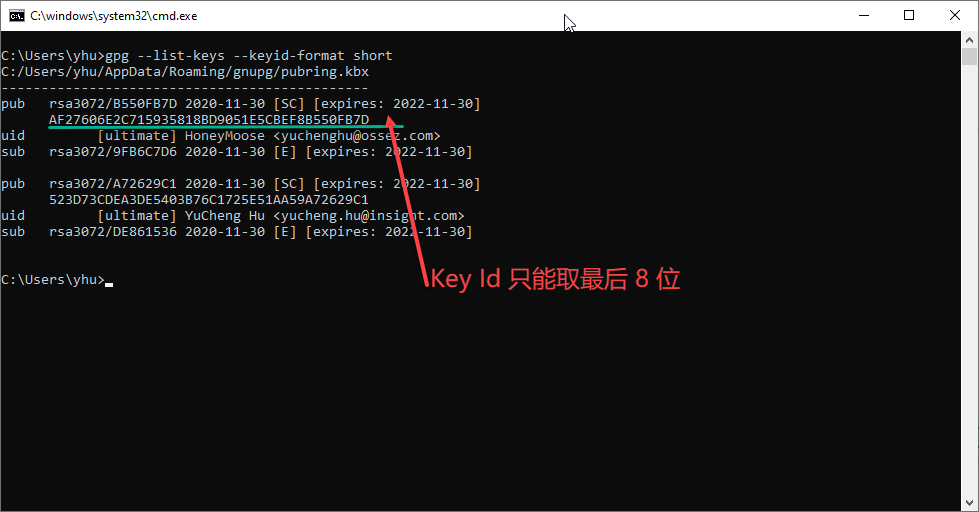
在对包进行签名之前,需要在 gradle.properties 配置文件中添加一些参数。 参数的内容如下: signing.keyId=YourKeyId signing.password=YourPublicKeyPassword signing.secretKeyRingFile=PathToYourKeyRingFile ossrhUsername=your-jira-id ossrhPassword=your-jira-password signing.keyId signing.keyId 为你在 Kleopatra 选择 Key 的 ID。 这里有一个坑就是这个 ID 的长度只能是 8 位。 在你的命令行工具中运行: gpg --list-keys --keyid-format short 你能看到所有你计算机中的 key,这个 key 只能取最后 8 位,否则你将会看到签名的错误信息。 signing.password 这个是你在创建 key 的时候使用的密码,在这里是保存为明码的。 你需要讲这个密码填写到这个参数中。 signing.secretKeyRingFile 这个应该是让很多人很困惑的地方。secretKeyRingFile 是什么东西?其实就是你 gpg key 的 secret。 在 Kleopatra 中选择你需要导出的 key,然后右键选择back up secret。 在弹出的对话框中,修改后缀名为 gpg。 然后修改 signing.secretKeyRingFile 参数为绝对路径指向到这个具体的文件(不是目录)。 例如,我们的这里的参数配置就是: signing.secretKeyRingFile=C:/Users/yhu/.gnupg/HoneyMoose.gpg 仓库用户名和密码 至于后面的 2 个参数就比较简单了,就是你中央仓库上传需要使用的用户名和密码。 上面的参数是非常重要的,主要是签名用的。 https://www.ossez.com/t/gradle-gradle-properties/791
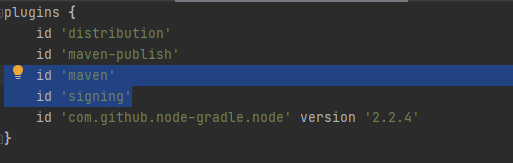
将包上传到 OSSRH 仓库中需要进行下面的一些配置就可以了。 当你知道配置参数的时候就会非常方便的上传了,配置的过程也不是很复杂。 导入插件 你需要导入 2 个插件到 Gradle 项目中。 id 'maven' id 'signing' 配置打包任务 如果你使用的是 Java 项目的话,你需要将源代码和文档都进行打包。 添加下面 2 个打包任务 task javadocJar(type: Jar) { classifier = 'javadoc' from javadoc } task sourcesJar(type: Jar) { classifier = 'sources' from sourceSets.main.allSource } 然后将程序和代码进行压缩成一个归档文件。 使用下面的命令进行归档。 artifacts { archives javadocJar, sourcesJar } 签名 要上传到中央仓库,签名是必须的。 添加下面的任务进行签名 signing { sign configurations.archives } 同时,你还需要在 C:\Users\yhu.gradle 文件夹中创建一个 gradle.properties 文件。 根据你的操作系统不同和用户不同,上面的路径需要自行调整下。 内容如下。 signing.keyId=YourKeyId signing.password=YourPublicKeyPassword signing.secretKeyRingFile=PathToYourKeyRingFile ossrhUsername=your-jira-id ossrhPassword=your-jira-password 根据你参数的不同来进行调整。 有关需要调整的参数和生成的秘钥等,请参考:Gradle 签名的配置文件 gradle.properties 文章中的内容。 设置 Metadata 和上传 在你的 Gradle 的构建文件中,定义: group = "com.example.applications" archivesBaseName = "example-application" version = "1.4.7" 上面的配置就等于是 Maven POM 文件的包定义了。 然后添加上传的 Task 到你的 gradle 文件中。 uploadArchives { repositories { mavenDeployer { beforeDeployment { MavenDeployment deployment -> signing.signPom(deployment) } repository(url: "https://oss.sonatype.org/service/local/staging/deploy/maven2/") { authentication(userName: ossrhUsername, password: ossrhPassword) } snapshotRepository(url: "https://oss.sonatype.org/content/repositories/snapshots/") { authentication(userName: ossrhUsername, password: ossrhPassword) } pom.project { name 'Example Application' packaging 'jar' // optionally artifactId can be defined here description 'A application used as an example on how to set up pushing its components to the Central Repository.' url 'http://www.example.com/example-application' scm { connection 'scm:svn:http://foo.googlecode.com/svn/trunk/' developerConnection 'scm:svn:https://foo.googlecode.com/svn/trunk/' url 'http://foo.googlecode.com/svn/trunk/' } licenses { license { name 'The Apache License, Version 2.0' url 'http://www.apache.org/licenses/LICENSE-2.0.txt' } } developers { developer { id 'manfred' name 'Manfred Moser' email 'manfred@sonatype.com' } } } } } } 在完成上面所有的配置后,直接运行就可以上传了,但是需要注意的是,根据你项目的不同,上面的配置参数也是需要一定修改的。 https://www.ossez.com/t/gradle-ossrh/790
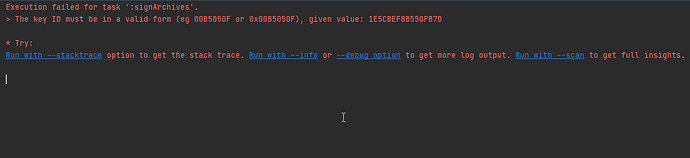
具体的错误提示信息如下: The key ID must be in a valid form (eg 00B5050F or 0x00B5050F), given value: 1E5CBEF8B550FB7D 问题和解决 这个问题比较蠢。与 Gradle 的插件 id ‘signing’ 有关。 可以反问源代码:https://github.com/gradle/gradle/blob/124712713a77a6813e112ae1b68f248deca6a816/subprojects/security/src/main/java/org/gradle/plugins/signing/signatory/pgp/PgpKeyId.java 在这个源代码中有一个对 Key 校验的方法: private static String normaliseKeyId(String keyId) { String keyIdUpped = keyId.toUpperCase(); switch (keyIdUpped.length()) { case 10: if (!keyIdUpped.startsWith("0X")) { throw new IllegalArgumentException("10 character key IDs must start with 0x (given value: " + keyId + ")"); } return keyIdUpped.substring(2); case 8: if (keyId.startsWith("0X")) { throw new IllegalArgumentException("8 character key IDs must not start with 0x (given value: " + keyId + ")"); } return keyIdUpped; default: throw new IllegalStateException("The key ID must be in a valid form (eg 00B5050F or 0x00B5050F), given value: " + keyId); } } 从这个方法中,你可以看到如果你的 Key ID 是 10 位的,你需要使用 0X 开头。 如果你的 key ID 超过 10 位就直接报错了。 在 Kleopatra 中,默认给了 16位的 Key Id,如果你直接拷贝的话,只会报错。 因此,根据上面的问题: signing.keyId= 参数应该只能保留 8 位置。 因此 signing.keyId= 的配置应该为: signing.keyId=B550FB7D 通过上面的调整后再进行编译,你应该不会遇到上面错误问题。 https://www.ossez.com/t/gradle-00b5050f/789
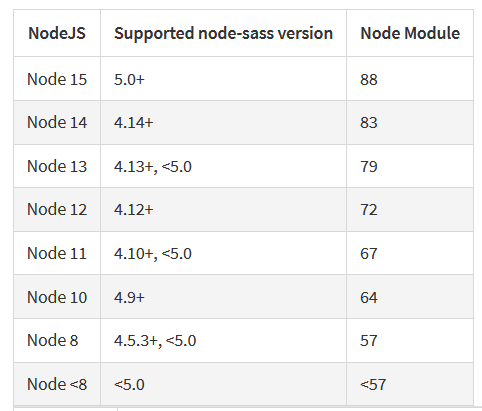
在进行编译的时候运行到下面的错误: Node Sass does not yet support your current environment: Windows 64-bit with Unsupported runtime (88) 这是因为有版本问题: 如果你使用 “node-sass”: “^4.14.1” 的版本的话,那么你需要将 node 的版本调整为: 14 的版本。 然后再重新编译后就没有问题了。 https://www.ossez.com/t/node-sass-does-not/788
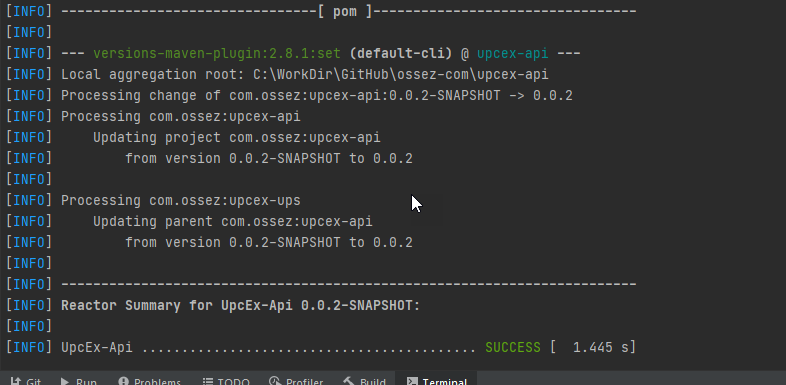
在将 Maven 的包上传到中央仓库并且创建发行版之前需要对包进行 GPG 签名。 如果你使用的是 Window 操作系统,请参考: https://www.ossez.com/t/windows-gpg-key/745 页面中的内容来对 GPG key 生成器进行安装,并且创建一个 key。 需要注意的时候,你创建的 Key 还要上传到 Key 的公钥仓库中,具体的办法请参考文章:https://www.ossez.com/t/gpg-maven-upload-your-public-key-and-try-the-operation/785 中的内容。 当你完成所有操作后,你就可以对你的 POM 文件进行修改了。 对 POM 文件进行修改 对 POM 进行有几个地方需要进行修改,有些地方的修改是一次性的。 我们假设你现在的 POM 不具有任何部署条件。 我们也是参考了官方的配置文件说明:https://central.sonatype.org/pages/apache-maven.html 首先你的版本号是不能包含有 -SNAPSHOT 这个关键字的。 可以使用下面的命令: mvn versions:set -DnewVersion=0.0.2 这个 mvn 的命令将会搜索你系统中的版本,并且将版本进行重命名并且统一。 从控制台的输出中,我们已经看到版本号进行了调整。 添加 maven-gpg-plugin 插件 在 pom 文件中,添加 maven-gpg-plugin 插件到插件列表中。 这个插件的位置是位于 build 下面的。 具体内容入下,你可以不需要对任何内容进行修改,如果你有高版本的话,也可以使用高版本。 <build> <plugins> <plugin> <groupId>org.apache.maven.plugins</groupId> <artifactId>maven-gpg-plugin</artifactId> <version>1.5</version> <executions> <execution> <id>sign-artifacts</id> <phase>verify</phase> <goals> <goal>sign</goal> </goals> </execution> </executions> </plugin> </plugins> </build> 添加 .m2 目录下的 settings.xml 需要添加的内容如下: <settings> <profiles> <profile> <id>ossrh</id> <activation> <activeByDefault>true</activeByDefault> </activation> <properties> <gpg.executable>gpg2</gpg.executable> <gpg.passphrase>the_pass_phrase</gpg.passphrase> </properties> </profile> </profiles> </settings> 需要注意的是可以执行的文件,在上面我们使用了 gpg2,如果你的操作系统中没有这个的话,你有可能会使用 gpg,这个与你的安装有关。 可以在 Windows 下运行 cmd,以确定 gpg 被添加到你的系统中了。 秘钥部分为最开始你创建的秘钥,这个是在 Kleopatra 中可以找到的。 根据你需要安装的秘钥,拷贝上面的 Key-ID 填到这里即可。 完成所有上面的配置后运行命令: mvn clean deploy 然后等待服务器的反馈结果。 一般来说需要几个小时后你的库才会被全世界都看到。 是不是很激动呀。 鼓励所有有条件的公司和个人都可以这样将开源项目上传到中央 Maven 仓库中。 https://www.ossez.com/t/maven-package-gpg/787