
Comcast 的网络还有一个问题就在于高延迟率。 它的延迟率出现是比较随机,有时候路由器上会提示一下高延迟率。 不过这个高延迟率其实对真实的使用问题并不是很大。 但终究是没有比有更好。 https://www.isharkfly.com/t/comcast/17748

可以在命令行输入下面的命令 netsh wlan show drivers 从上面的输出可以看到当前 Wifi 的版本是 Wi-Fi 6 的版本。 C:\Users\yhu>netsh wlan show drivers Interface name: Wi-Fi Driver : Intel(R) Wi-Fi 6 AX201 160MHz Vendor : Intel Corporation Provider : Intel Date : 1/2/2025 Version : 23.110.0.5 INF file : oem144.inf Type : Native Wi-Fi Driver Radio types supported : 802.11b 802.11g 802.11n 802.11a 802.11ac 802.11ax FIPS 140 mode supported : Yes 802.11w Management Frame Protection supported : Yes Hosted network supported : No Authentication and cipher supported in infrastructure mode: Open None Open WEP-40bit Open WEP-104bit Open WEP WPA-Enterprise TKIP WPA-Enterprise CCMP WPA-Personal TKIP WPA-Personal CCMP WPA2-Enterprise TKIP WPA2-Enterprise CCMP WPA2-Personal TKIP WPA2-Personal CCMP Open Vendor defined WPA3-Personal CCMP Vendor defined Vendor defined WPA3-Enterprise 192 Bits GCMP-256 OWE CCMP WPA3-Enterprise CCMP Number of supported bands : 2 2.4 GHz [ 0 MHz - 0 MHz] 5 GHz [ 0 MHz - 0 MHz] IHV service present : Yes IHV adapter OUI : [00 00 00], type: [00] IHV extensibility DLL path: C:\WINDOWS\system32\IntelIHVRouter10.dll IHV UI extensibility ClSID: {00000000-0000-0000-0000-000000000000} IHV diagnostics CLSID : {00000000-0000-0000-0000-000000000000} Wireless Display Supported: Yes (Graphics Driver: Yes, Wi-Fi Driver: Yes) 或者通过单击 Wifi 设置中的配置按钮。 在上面的界面中,可以查看到当前计算机使用的 Wi-Fi 的版本。 由此可以确定的你的计算机能够最高支持到 Wi-Fi 几。 https://www.isharkfly.com/t/windows-wifi/17746

Firefox Relay 是 Mozilla 开发的一个隐私保护服务,主要功能是创建电子邮件别名来保护您的真实邮箱地址。 主要功能: 邮件转发别名:生成临时或永久的邮箱别名,转发邮件到您的真实邮箱 垃圾邮件防护:如果某个别名开始收到垃圾邮件,可以直接删除该别名 隐私保护:在注册网站、订阅服务时使用别名,避免暴露真实邮箱 这个服务与苹果的"Hide My Email"功能类似,都是通过邮件转发来保护用户隐私。对于经常在线注册各种服务的用户来说,是一个很实用的隐私工具。 使用了下,感觉还挺好的。 对于真实邮件,Firefox Relay 可以隐藏,但唯一不好的就是邮箱名是随机的,可能不好记。 一不留神,为了支持 FireFox 就订阅了他们 12 块钱 1 年的服务。 注册了一个带有域名的邮箱地址。 自从从事 Web 开发这个工作以来,很多时候都享受到了开源带来的便利和工作效率的提升。 早在北京的时候,Firefox 还是一个小狐狸,很多知识都是从 mozilla 上面学习到。 不是很喜欢现在 Chrome 一家独大的情况,很多时候都想尽量的使用 FireFox。 但很遗憾的是 Firefox 在有时候会有渲染的问题,很多软件的开发都基于 Chrome 在做。 Google 早就不是那个不作恶的 Google,现在的 Google 更注重的是商业价值和利益,离心目中的理想是越来越远。 就算是捐助给 mozilla 基金会吧,希望 FireFox 这只小狐狸能够坚强的在互联网上占有一席之地。 https://www.isharkfly.com/t/firefox-relay/17668
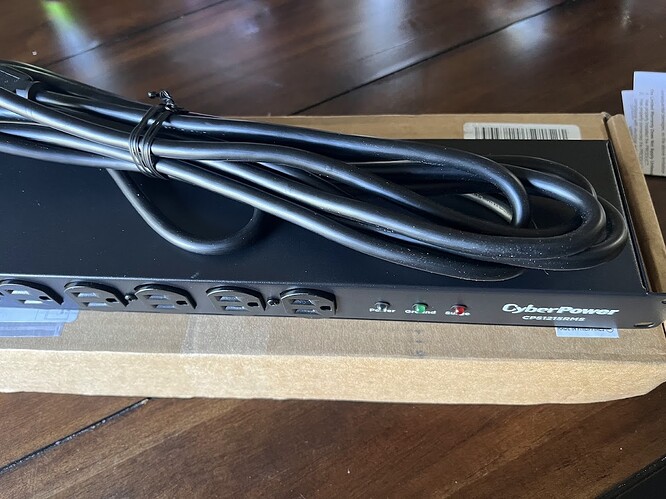
简陋是简陋了点,当发现买个插线板还不便宜的时候。 这是果断上了一个 PDU。 在机房及通信硬件领域中常见的PDU,指的是机柜电源插座,是英文"Power Distribution Unit"的缩写,即电源分配单元。 以前在做机房设备的时候,基本上一个机柜都会配一个 PDU。 现在 PDU 价格便宜不少,装起来还挺有一个意思。 https://www.isharkfly.com/t/topic/17634
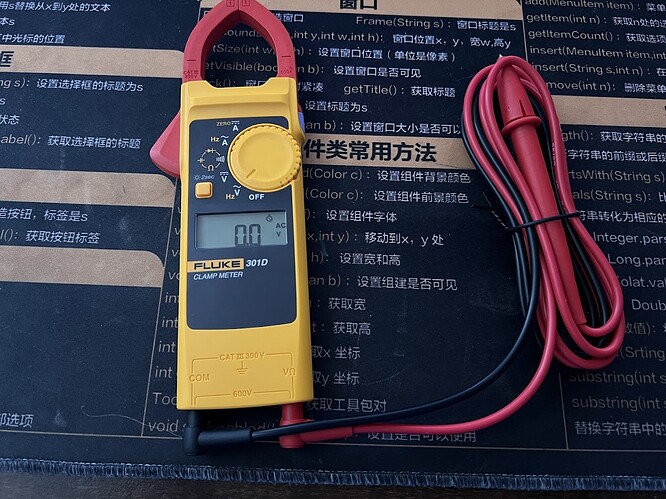
这钳表和想象中的比起来是越来越小。 就一般使用场景来说,也足够了,虽然不是 true-RMS,但一般的测量足够。 https://www.isharkfly.com/t/fluke-d301d/17630
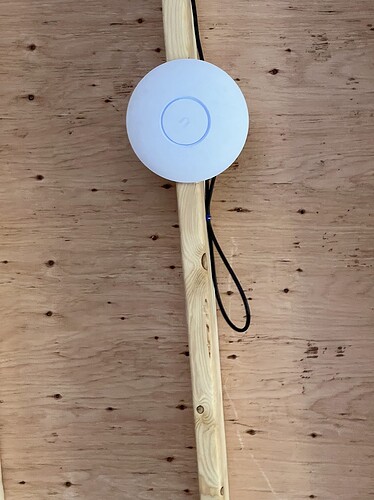
这个位置的 AP 并不需要太高的网络传输速率,也不需要最新的 WIFI 7 的版本。 其实工况也比较恶劣。 干脆 Ebay 上买了个二手的,35 块钱,网速还能干上去 400 多的 Wifi。 https://www.isharkfly.com/t/unifi-ap/17624
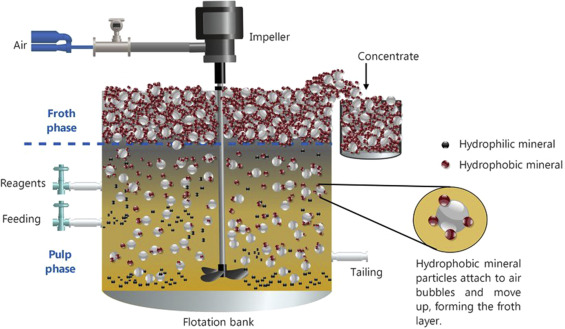
中金的这个新闻: 格栅板脱落致六名学生坠浮选槽身亡 又勾起了对知识的渴望。 通过对 AI 的搜索来了解下冶金工业中的浮选工艺。 有关浮选工艺的解释如下面的 AI 回复。 冶炼浮选工艺是矿物处理中的重要技术,主要用于分离有价矿物。以下是详细介绍: 浮选原理 基于矿物表面润湿性差异,通过添加浮选药剂改变矿物表面性质,使目标矿物附着在气泡上浮至表面,实现分离。 工艺流程 1. 磨矿阶段 粗磨:将矿石破碎至合适粒度 细磨:达到矿物单体解离度要求 粒度一般控制在0.074-0.3mm 2. 调浆准备 调节矿浆浓度(通常20-40%) 控制pH值 添加分散剂 3. 药剂添加 捕收剂:提高目标矿物疏水性 起泡剂:产生稳定泡沫 调整剂:调节矿浆环境 抑制剂:抑制不需要矿物上浮 4. 浮选分离 粗选:初步分离 精选:提高精矿品位 扫选:提高回收率 主要参数控制 工艺参数 矿浆浓度:20-45% 充气量:0.3-1.0 m³/(m²·min) 搅拌强度:根据矿物性质调节 浮选时间:2-20分钟 药剂制度 捕收剂用量:20-200g/t 起泡剂用量:10-80g/t 调整剂用量:100-2000g/t 抑制剂用量:100-1000g/t 常见浮选类型 1. 正浮选 目标矿物上浮,脉石矿物下沉 2. 反浮选 脉石矿物上浮,目标矿物下沉 3. 混合浮选 多种有价矿物一起上浮,后续分离 4. 优先浮选 按矿物种类依次浮选 设备配置 主要设备 浮选机:机械搅拌式、充气搅拌式 调浆槽:药剂混合调节 浓缩机:矿浆浓缩 过滤机:精矿脱水 浮选机类型 SF型浮选机 BF型浮选机 JJF型浮选机 柱式浮选机 影响因素 矿物学因素 矿物组成 嵌布粒度 氧化程度 泥化程度 工艺因素 磨矿细度 矿浆浓度 药剂制度 浮选时间 操作因素 充气量 搅拌强度 矿浆pH值 温度 质量指标 技术指标 品位:精矿中有价成分含量 回收率:精矿中有价成分占原矿的百分比 富集比:精矿品位/原矿品位 计算公式 回收率(%) = (精矿品位 × 精矿产率) / 原矿品位 × 100% 富集比 = 精矿品位 / 原矿品位 工艺优化 流程优化 阶段磨矿阶段选别 部分混合浮选 快速浮选 载体浮选 药剂优化 组合捕收剂 新型调整剂 环保药剂 药剂制度优化 应用领域 有色金属 铜矿浮选 铅锌矿浮选 镍矿浮选 钼矿浮选 黑色金属 铁矿反浮选 锰矿浮选 非金属矿物 萤石浮选 石墨浮选 重晶石浮选 环保要求 废水处理 浮选废水回用 药剂残留处理 重金属离子去除 药剂选择 低毒性药剂 生物降解性药剂 减少环境污染 这套工艺需要根据具体矿物特性和生产要求进行针对性设计和优化。 简单的意思就是把矿石研磨成很小的粉末,然后通过水和药剂的混合让有需要的矿粉漂浮在表面,然后把矿粉进行烘干。 获得烘干后的矿粉直接进行冶炼。 英文表述 浮选工艺的英文表述为:flotation process 在中文中没有找到具体的图片,英文倒还找到了一个。 救援难度 因是矿粉和液体药物的混合物,据懂行的人说就和泥石流和流沙差不多。 抛开化学药品的腐蚀性不说,就从物理的角度来说救援难度和人调入谷仓的救援相同,并且可能更加困难,可能是因为流动性更好。 这也就是这次悲剧的主要原因。 貌似这又有一个名词:剪切稀化效应。 剪切稀化(英语:shear thinning),又称为假塑性(pseudoplastic),是指流体的粘度随剪应变率的增加而减小。拥有此种性质的流体属于非牛顿流体,其剪应力与剪应变率之间的关系可通过幂律函数来表示。熔岩、番茄酱、生奶油、血液、颜料、指甲油、巧克力酱等都有剪切稀化的特性。 物理学不是我的专业,只对其中的一些名词进行一些探索。 https://www.isharkfly.com/t/topic/17570

曾轰动华人圈的谷歌华裔工程师杀妻案再次开庭,凶嫌陈立人(Liren Chen,音译)出庭照曝光,身材明显发福。 2025年7月14日,此案的第二场传票听证会在美国加州圣塔克拉拉高等法院举行,两份对案件影响重大的材料被正式提交法庭: 一份是前女友“蒋小姐”(Jiang,音译姓蒋)写的一个中文谷歌文件(Google doc),被她称为是自己的“日记”,记录了自己和陈的感情 。 这份文件曾被蒋小姐分享给已婚的陈立人,并最终被陈立人的妻子、遇害人于轩一(Xuanyi Yu,音译)发现 ,引发了两人的争执。 如今,这份文件也成为本案的核心证据之一 。 前女友“日记”曝光,律师请求保密被拒 去年1月,硅谷发生惊天血案:清华毕业、年轻的谷歌工程师陈立人竟然将妻子于轩一活活打死,手段极其残忍! 在今年6月底进行的预审中,陈立人的长期好友、此案的报警人在证词中表示,死者于轩一案发前向她透露,陈立人与前女友之间“牵扯不清”、“藕断丝连”,让她感到“受伤、无语”。 于轩一说,陈立人曾亲口告诉她,前女友来湾区时两人曾见面,分别时他还送蒋到机场,亲吻了对方。 事实部分,只要上网找找都能看到完整的版本,虽然很多细节的描述没有公布,但大致的脉络是清晰的。 这场 3 个人的关系没有想到是以这样的一种悲惨的方式收场。 这个案子之所以受到关注主要是人设,背景,行为等各个方面的点实在是太多了,让人感觉没有办法去找到一个可以切入的点,怎么去理解其中 3 个人的各自行为。 我们现针对一个个具体的问题来进行一些探讨。 家庭背景 无疑在家庭背景方面,从当前爆料的情况来看,陈立人的妻子不占优势。 上网考古下有关成都七中的历史和成都七中的一些背景。 在四川这个省份来讲的话,成都七中无疑是最好的存在。陈立人在成都七中应该有非常强的优越感。 当然,陈成立人的前女友也会有同样的感觉。 对比南北文化和紧急差异来说,现吉林省松原市的城市建设和发展指数来说是不如成都。 当然,只从经济发展的角度来看,也是不公平的。文化习惯和认知水平在经济的发展中是会被逐步固化,从而会形成一定的优越感。 2024 年成都市的 GDP 为 23511 亿元,吉林省松原市的 GDP 在 2024 年才刚刚过 1 千亿元。拿一个地级市和省会来比较显然是不合理的。 成都市 GDP 超过了松原市整整 23 倍。这种优越感会在整个家庭的相处中逐步倍强化,尤其是在走向社会后,高考的成绩并不能证明什么。 所以说在他们俩的关系中,陈立人和他的前女友应该是属于同一个水平的。 相对来讲,陈立人的妻子是属于一个更弱势的情况。 虽然,他们同在 Google 工作,收入水平相当,但家庭背后的实力之间可能会有些差距,对都已经都在美国了,家庭因素相对国内来说已经是降低了很多,但与生俱来的优越感要真正做到平等,我相信也不是一天就能完成的事情。 文化习惯 放眼中国来说,南北文化差异是真实存在的。 南方女孩相对内敛,这从陈立人前女友写的 Google doc 文档能表现出来。 对于成绩较好的学生来说,内心其实并不一定是真的开心,但表达欲又比较强,同时文笔还比较好。 把自己内心的想法写下来通常是调节内心活动的一种方式。这个和北方女孩是有区别的。 可以理解这个就是典型的南北差异。 当一件事情发生后,可能北方女孩子就当场撕逼了,南方女孩子在现场反应可能不大,随后你可能会收到洋洋洒洒几万字的小短文。 作为南方人来说,我相信陈立人女友的短文就是写给自己的。可能有想过分享给自己的前男友,但如果解读为故意这样做的,我不敢同意。 唯一不太理解的是,对自己过去的总结只有 2 页纸,这实在有点少。 因没有看到原文,所以不敢妄加揣测,我觉得陈立人前女友可能也不愿意回顾太多的细节,只是想潦草的画个句号,告诉自己一切都结束了。 混乱的留学圈 现在的留学圈早就不像从前了。 这一切的导火索又源于一次不相干的事情。 陈立人前女友的婚姻挫折导致了她沮丧和情绪低落,所以她吧自己的日记加了这部分的内容写给自己。 但,打开朋友圈这堆破事又没有可以倾诉的对象,毕竟未婚夫这实在是太丢人了。 所以小短文的顺序是先加内容为后发,而不是后发再改内容。 如果陈立人前女友想让陈立人知道自己的心路历程,她是可以先发再改。 看见当时她就想要个倾诉对象吧。 陈立人却有点瞌睡碰到枕头。 作为吃瓜群众来说,这场悲剧却又有点像是蝴蝶效应,西雅图警方的一次行动引发了这场彻头彻尾的悲剧。 陈立人会和前女友再次走到一起吗 不认为陈立人会和前女友再次走到一起。 不管是否相信,我觉得他们会因太熟悉对方了而无法走到一起,他们之间更像是当彼此受到伤害的时候彼此需要的一个倾诉对象。 就好像在一个很大的房子中隐藏了一个小阁楼,这个小阁楼可能就是他们之间最真实的存在。彼此应该是非常了解对方,就是因为太了解了而无法走到一起,但内心中的细微思维变化又需要一个倾诉对象,互相了解的人最容易进行倾诉。 陈立人前女友的角色 陈立人前女友的角色在这场悲剧中的定位比较尴尬。 你可以把她认为是一个绿茶,也可以把她认为是现实社会中被自己未婚夫背叛的受害者,也可以认为是破坏她人家庭的第三者。 但这个问题的核心应该不在于她,在真实社会中,任何人都可以给任何人发送消息的权力,我们不能认为她发送了小作文就是对陈立人和陈立人家庭的玩弄。 关键的的陈立人,陈立人在受到小作文后的行为选择才是这场悲剧的关键。 我们不能因为外面有苍蝇就把所有的问题都归咎在苍蝇身上,针对外界的苍蝇,你的行为和选择是什么,怎么才能维护食品不变质呢? 找前任倾诉是最容易产生误解和出现误判,希望但遇到困难的时候哪怕是你的前任再了解你,也不要选择和前任进行倾诉,男女都一样。 陈立人妻子有误判吗 作为受害者,我认为陈立人的妻子是有些误判的。 误判的地方在于她完全相信陈立人回和其前女友复合,同时对自己在陈立人心中的位置模糊。 据说是因为陈立人在这之前经常拿着自己的妻子和前女友进行比较,这个比较我相信是存在在生活的各个方面,包括家庭关系和地位,包括经济能力,工作能力等等。 长期的比较会让其产生压抑和对自己的不自信,对是当地高考状元的她来说显然是无法接受。 处于这种环境下,会有自己怀疑,然后回进而开始怀疑身边的人。诚然就是自己的家庭不如陈立人的家庭,我又不和他全家生活,只要别招惹我太多,大家都在美国,其他的话当去你大爷。 据说,其妻还在陈立人的手机上装了定位,如此的不信任。不过话也说过来,聪明反被聪明误,要给自己的另一半进行定位,其实现在是很容易的事情,手机上都有 GPS 跟踪功能,每天去了哪里一清二楚。 车上也有 GPS,每天车去了哪里也一清二楚,你能盯一次,但能 24 小时都盯着吗?换句话说,就算盯着了,发现了又能怎么样? 还不如退而求其次,进行深入沟通,让陈立人放下戒备,把愿意说的话都告诉你,就算不告诉你的,你也不强求,给他保留一点点,也许能够更好的处理家庭之间的问题。 生活中没有那么多非黑即白的事情,这个不是做题目,只有一个正确答案。 人生是有很多的选择。 陈立人行凶 这个最无法理喻。 可能是陈立人自己的压力也到达了一定的程度,3 小时活活的打死对方,这是需要多大的怨恨才能做到。 使用枪支等凶器,这个行为是完全冲动的,发展非常迅速就在秒之间。 3 小时,期间有多次可以停手,感觉是他把生活,工作,家庭上面的所有怨恨一股脑的撒在了自己妻子身上。 就冲这个行为,我支持重判,3 个小时的蹂躏,时间太长。 哪怕是其中收手,我都觉得属于是长期压抑下的冲动型犯罪,我感觉他在这个过程中找到了自己的发泄,同时又害怕自己的行为会给自己的未来带来影响。 只要动手了,肯定会被妻子报警,并且家庭暴力的这个罪名是少不了,工作上肯定是保不住了,离婚肯定是实锤了。 既然感情都这么不稳定了,离婚,互相放过对方,在当前选择分居,可能是最好的选择也是能互相保护的最好方式。 教育中的缺失 相信他们 3 个人在整个这几十年的历程中肯定是处于顶部。 在整个学习的过程中,多是属于别人家的孩子那种,我相信他们也很愿意享受这种荣誉,也有实力维护这个荣誉。 我是没这个本事,所以不是别人家的孩子,喜欢差不多的模糊感。 因为我们教育中的缺失,我们只告诉了我们的孩子要成绩好,出人头地,但没有告诉孩子人生其实还有很多选择,而且心理健康和承压能力更重要。 当走向社会后的压力不是一个题目是选 A 还是 B 的问题,这个压力是全方位的,每天我们都在做选择,但这个选择可能不是正确的选择。 但可能是自己觉得在当时情况下的最优选择。 愿所有人都有个更强大的内心,远离危险。 https://www.isharkfly.com/t/topic/17558

58 同城的整体信息架构从模仿 craigslist 开始。 craigslist 自身的发展也遇到了非常多的问题,比如说我们最常用的二手交易买卖,现在被 facebook marketplace 弄得市场也丢了很多。 再加上几千年不变的界面,都有点审美疲劳。 虚假信息问题 不管是 58 还是 craigslist ,虚假信息无法避免,因为任何一个人都可以非常容易的注册一个账户发布内容。 facebook marketplace 本身是和自己的 facebook 账号绑定的,在发布信息的时候还得自己惦念下,同时完成交易后还有评价。 虽然无法完全避免虚假信息的问题,但还是提高了门槛。 信息获取渠道 本身 58 提供的就是一个大杂烩的信息,在以前智能手机不普及的阶段,基本上还是能够通过信息发布获得流量。 现在个人的信息发布平台多如牛毛,针对具体的内容发布,人们往往开始寻找更加专业化的平台,比如说一个企业要招聘,那他们多会到专业平台上发布,而少到 58。是不是拉低自己企业形象不说,还很难找到合适的人。 世界变了,58 同城业务出现断崖式下降,现在应该不是过冬的问题,这个网站已逐步的走向奄奄一息。 https://www.isharkfly.com/t/58-30/17486

介绍 本文将会指导你如何在 Discourse AI 中设置 Google 的 Gemini API key。 在这之前,你需要有一个 Google Cloud 账号,Gemini AI 不是一个免费的服务,所以你需要在 Google 中设置账号信息等。 同时,你还需要有 Google Cloud 的管理权限才行。 一些有关 Google Key 创建的重要内容,可以参考 Gemini Developer studio 页面中的信息。 61423e3471367450d097d5baed34d0231d6ea739_2_690x159690×159 22.4 KB NOTE: 针对 Google Cloud,你需要有管理员权限才可以,否则主要是因为 Key 的权限问题。 哪怕你是通过 Gemini Developer studio 来创建 Key,在 Key 的创建过程中,也还是需要你提供 Google Cloud的项目信息。 2025-06-12_10-06-451391×752 100 KB 上面 拉出来的项目都是我们已经在 Google Cloud 中创建的项目。 第一步:设置 Google Cloud 项目 设置 Gemini API key 可能需要你的 Google Cloud 管理员权限,同时还需要你创建一个支付账户,这样当你的项目在使用 Gemini API 的时候,Google 将会以云平台账单的形式通过你的支付账户来进行支付。 当然,你可以通过 Gemini Studio 来创建项目并且连接到项目中。 但我们发现,直接通过 Google Cloud 的管理员控制台来进行处理更加简单。 进入管理员控制台: Google Cloud admin for API 在进入控制台后,需要确定希望使用 key 的项目。 14a3bcd1a475c66c83a74c3cfe415feeaa9a0ebe1192×568 58.3 KB 因为在 Google Cloud 的设计中,你可能会有很多的 Cloud 项目,在这里选一个你希望使用的项目。 7c48b3057b521f63909b6e2ce213d316ad2d5dc4569×500 29 KB 随后就在项目中为项目启用相关的服务就好了。 如果你还没有项目的话,你就需要创建一个项目了。 48a3d7aff739c933815bc197586c3bfb364e99f1_2_690x198690×198 22.6 KB 为了管理你的支出,你还需要为你的 Google Cloud 服务创建一个支付账户。 然后把你的项目关联进去就好了。 第二步:创建 Gemini API Key IMPORTANT! 记住需要妥善保管你的这个 Key,请阅读 Keep your API key secure 和 Best practices for securely using API keys 页面中的内容。 因为你的 key 可能会导致你的账单增加。 单击页面中的创建一个 key,然后把创建的 key 给保存下来。 48a3d7aff739c933815bc197586c3bfb364e99f1_2_690x198690×198 22.6 KB 这个 key 就是我们需要在 Discourse AI 中进行设置需要的。 60319530108169db96ec749bcf7cf6d180134274_2_517x305517×305 34 KB 这个 Key 现在应该设置在你的 key 列表中了。 单击编辑这个 key,我们需要为这个 key 设置使用权限。 b0d62d9e59dde0ccca2e1cb04014da33dc970c5c_2_689x214689×214 21.5 KB 设置这个 key 只能被用于进行 AI 的调用,选择: “Restrict key”,然后选择 “Generative Language API”. 040fc841bb79ddee220afa609f562ff4714f05ba_2_531x500531×500 65.1 KB 然后进行保存。 当然,你还可以限制只有你的网站能够调用这个 key。 e6b4d81aa59135a1e81c298ac053e958d192baa7_2_689x499689×499 92.2 KB 这样的话,哪怕是这个 Key 被泄露了,别人也无法通过其他的域名来进行调用,等于这样能够获得双重安全性。 所以,Google Cloud 的 Key 是可以通过 显示 Key 来多次显示的。 2025-06-12_10-23-492202×626 123 KB 感觉这个点就比较踏实。 毕竟 key 太多了,自己都忘记了。 第三步:在 Discourse AI 插件中进行配置 现在,你需要在 Discourse 的 AI 插件中进行配置,配置路径为: Admin > Plugins > AI > LLMs 然后选择需要的语言模型进行配置。 2025-06-12_10-27-401199×1192 178 KB 随后可以进行测试,如果显示测试成功,则说明一切正常。 2025-06-12_10-40-021205×561 84.9 KB 第四步:查看 Key 的使用情况 Google 的 Key 使用是在 Google 云平台上用的,单击 : “Manage Billing Account” ac7438948b6655cbca6c339e8a835deada6d4e7f_2_690x127690×127 12.1 KB 如果没有问题,大概率可以看到下面的账单: …