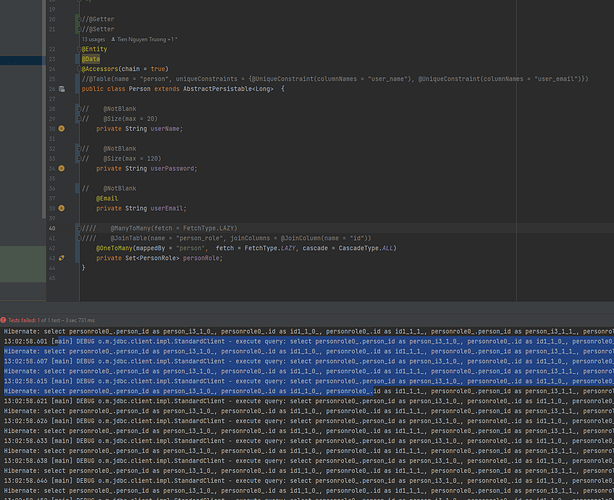
在 Spring JPA 1 对多查询的时候出现死循环的问题。 如下图所示: 所有的配置都是正确的的,就是没有办法获得数据,并且出现死循环 问题和解决 因为使用lombak的 @Data ,在toString()方法中产生死循环。 因为我们使用了 @Data 注解。 所有让 lombok 定义的 @ToString 类将会实现一个 toString() 方法。 在默认的情况下,将会指向类的名称,同时和每一个字段。 例如在使用 lazy @OneToMany 方法调用 hashCode() 的时候,fetch 可能有所有的实体类,这个对应用程序的运行可能产生非常大的性能问题。 同时,如果你在事务以外使用的话,可能会得到 LazyInitializationException 异常。 如果查询一个User实体,并打印,打印调用的是toString() 方法,toString()方法里面又有关联Dept对象。 所以导致 User 和子对象之间的两个对象互相调用并打印,形成一个递归调用,最后堆栈溢出。 基于上面的考虑,我们认为 @EqualsAndHashCode 和@Data 不应该应用在 JPA 的实体类上使用。 @ToString 还是可以使用的,因为我们可以使用 @ToString.Exclude 来设置不需要的字段或者使用 @ToString(onlyExplicitlyIncluded = true ) 来移除类, 对于 non-lazy 字段,我们可以使用@ToString.Include 注解。 例如我们的解决方案就是在 JPA 实体类中只使用 @Getter @Setter 注解。 基于上面的原因,这也是很多人建议使用 Lombok 的原因。 我们的理解还是可以使用的,别滥用,别图省事一个 @Data 到头。 https://www.ossez.com/t/spring-lombok/14129
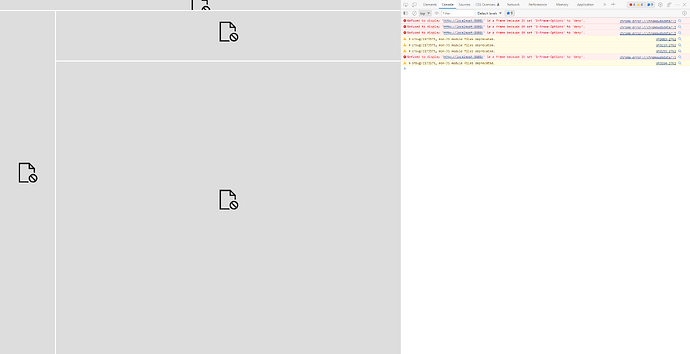
有一个项目启用了 Spring Security,后台使用的是 H2 数据库。 使用用户名和密码登录后没有问题,但登录后提示 ‘X-Frame-Options’ to ‘deny’. 错误。 错误信息如上图。 问题和解决 X-Frame-Options HTTP 响应头是用来给浏览器指示允许一个页面可否在 <frame>、<iframe>、<embed> 或者 <object> 中展现的标记。站点可以通过确保网站没有被嵌入到别人的站点里面,从而避免点击劫持 攻击。 X-Frame-Options有三种可配置值 X-Frame-Options: DENY X-Frame-Options: SAMEORIGIN X-Frame-Options: ALLOW-FROM https://example.com/ 第一个例子告诉浏览器不要(DENY)把这个网页放在iFrame内,通常的目的就是要帮助用户对抗点击劫持。 第二个例子告诉浏览器只有当架设iFrame的网站与发出X-Frame-Options的网站相同,才能显示发出X-Frame-Options网页的内容。 第三个例子告诉浏览器这个网页只能放在 https://example.com/ 网页架设的iFrame内。 不指定X-Frame-Options的网页等同表示它可以放在任何iFrame内。 X-Frame-Options可以保障你的网页不会被放在恶意网站设定的iFrame内,令用户成为点击劫持的受害人。 如上图所展示的内容,受害者通常是因为点击了来路不明的网页,在这个网页中通常有一个 IFrame 嵌入。 然后攻击者就可以利用这个漏洞来对用户的点击进行劫持。 Spring Security 的启用 在 Spring 中,我们可以使用下面的代码来进行同源性校验。 http.headers().frameOptions().sameOrigin(); 当然,更可以直接禁用这个校验。 针对我们的问题,使用同源性校验就可以满足要求了。 https://www.ossez.com/t/spring-security-x-frame-options-to-deny/14123
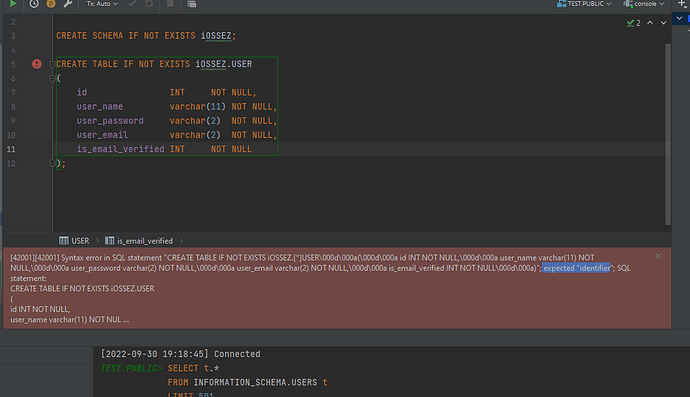
尝试使用 H2 数据库创建表,但是老是提示 expected "identifier 这个错误。 问题和解决 经过搜索后才知道,上面的错误是因为我们使用的表名 USER 是 H2 的关键字。 H2 的关键字列表为:Advanced 很明显这里 是一个关键字。 可以: 简单粗暴的对使用的关键字使用单引号 在JDBC 连接中使用 ;NON_KEYWORDS=USER 数据库关键字 到底应不应该使用 USER 作为用户表的命名呢? 搜索了下不同的说法,大部分都认为不应该将用户表的名称命名为 USER ,而应该使用 Person。 根据 ISO/IEC 11179-6:20 中规范的说法,我们应该避免使用 USER 来命名用户表,也不要使用 USERS 来命名。 数据库表的命名可以使用前缀和后缀的方式。 下面是有关的一些实例。 前缀 如果你的表可能超过有 100 个表的话,可以使用定义的前缀来命名,例如: REF_ 为参考表 OE_ 为 Order Entry 相关,这个值针对为物理级别的命名,而不是逻辑级别的 后缀 永远不要使用后缀来命名表,而应该使用后缀来命名其他的东西,但是这也不是绝对的的。 例如针对视图我们可以使用 _V 这个前缀来命名。 _fk 外键 _cac 缓存 _seg Segment _tr 事务 _fn 函数等 总结 针对表的命名没有绝对的统一的说法,但是针对一个公司或者一个项目,最好使用统一命名的标准。 对表进行一些系统性的区分,能够让我们更好的区分用途。 例如: 系统表(S_)可以用来定义系统的基本信息,更多是元数据等,这些数据是有关于系统运行的,通常例如可以定义 系统用户表(S_USER)、系统角色表(S_ROLE)等。 这样可以有效的避免关键字冲突。 很多时候,可能觉得这个是不是有点麻烦呀,很多项目可能不会超过几百个表。 但,免不了一些奇葩项目,有上千个表,经历过一个不是非常复杂的逻辑项目,但是表有 1300 多个,真不知道这个表是怎么建的,并且是各种奇葩的命名都有。 另外,千万别用 tbl 作为前缀来命名表,简直就是脱了裤子放屁,谁不知道你这个表是 tbl? https://www.ossez.com/t/h2-expected-identifier/14122
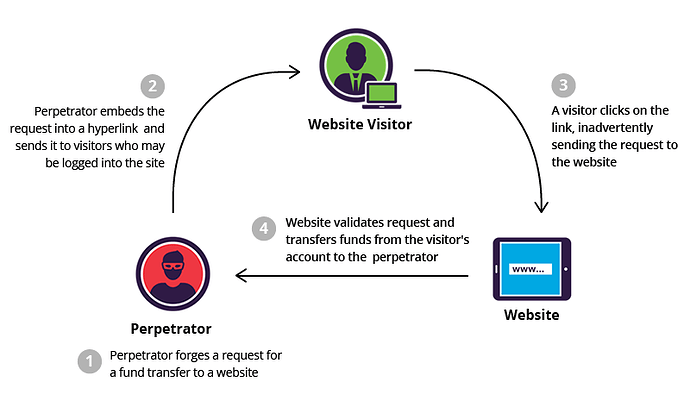
近期,因为需要研究 Spring Security 的安全机制,因为 Spring Security 说可以帮助避免 CSRF 攻击。 因此特地考古了相关的内容。 简单点解释就是 CSRF 盗用了你的 Cookies 中存的信息,伪造了你的请求。 有关 CSRF 介绍 CSRF(Cross-site request forgery),中文名称:跨站请求伪造,也被称为:one click attack/session riding,缩写为:CSRF/XSRF。 跨站请求伪造 (英语:Cross-site request forgery),也被称为 one-click attack 或者 session riding ,通常缩写为 CSRF 或者 XSRF , 是一种挟制用户在当前已登录的Web应用程序上执行非本意的操作的攻击方法。 相比,XSS 利用的是用户对指定网站的信任,CSRF 利用的是网站对用户网页浏览器的信任。 CSRF 的威胁 你这可以这么理解CSRF攻击:攻击者盗用了你的身份,以你的名义发送恶意请求。CSRF能够做的事情包括:以你名义发送邮件,发消息,盗取你的账号,甚至于购买商品,虚拟货币转账…造成的问题包括:个人隐私泄露以及财产安全。 CSRF这种攻击方式在2000年已经被国外的安全人员提出,但在国内,直到06年才开始被关注,08年,国内外的多个大型社区和交互网站分别爆出CSRF漏洞,如:NYTimes.com(纽约时报)、Metafilter(一个大型的BLOG网站),YouTube和百度HI…而现在,互联网上的许多站点仍对此毫无防备,以至于安全业界称CSRF为“沉睡的巨人”。 相比XSS,CSRF的名气似乎并不是那么大,很多人都认为CSRF“不那么有破坏性”。真的是这样吗? Case 1 这一天,小明同学百无聊赖地刷着Gmail邮件。大部分都是没营养的通知、验证码、聊天记录之类。但有一封邮件引起了小明的注意: 甩卖比特币,一个只要998!! 聪明的小明当然知道这种肯定是骗子,但还是抱着好奇的态度点了进去(请勿模仿)。果然,这只是一个什么都没有的空白页面,小明失望的关闭了页面。一切似乎什么都没有发生…… 在这平静的外表之下,黑客的攻击已然得手。小明的Gmail中,被偷偷设置了一个过滤规则,这个规则使得所有的邮件都会被自动转发到hacker@hackermail.com。小明还在继续刷着邮件,殊不知他的邮件正在一封封地,如脱缰的野马一般地,持续不断地向着黑客的邮箱转发而去。 不久之后的一天,小明发现自己的域名已经被转让了。懵懂的小明以为是域名到期自己忘了续费,直到有一天,对方开出了 $650 的赎回价码,小明才开始觉得不太对劲。 小明仔细查了下域名的转让,对方是拥有自己的验证码的,而域名的验证码只存在于自己的邮箱里面。小明回想起那天奇怪的链接,打开后重新查看了“空白页”的源码: Case 2 假如一家银行用以执行转账操作的URL地址如下: https://bank.example.com/withdraw?account=AccoutName&amount=1000&for=PayeeName 那么,一个恶意攻击者可以在另一个网站上放置如下代码: <img src="https://bank.example.com/withdraw?account=Alice&amount=1000&for=Badman" /> 如果有账户名为Alice的用户访问了恶意站点,而她之前刚访问过银行不久,登录信息尚未过期,那么她就会损失1000资金。 这种恶意的网址可以有很多种形式,藏身于网页中的许多地方。此外,攻击者也不需要控制放置恶意网址的网站。例如他可以将这种地址藏在论坛,博客等任何用户生成内容的网站中。这意味着如果服务端没有合适的防御措施的话,用户即使访问熟悉的可信网站也有受攻击的危险。 透过例子能够看出,攻击者并不能通过CSRF攻击来直接获取用户的账户控制权,也不能直接窃取用户的任何信息。他们能做到的,是欺骗用户的浏览器,让其以用户的名义执行操作。 防御 受害者必须依次完成两个步骤: 登录受信任网站A,并在本地生成Cookie。 在不登出A的情况下,访问危险网站B。 看到这里,你也许会说:“如果我不满足以上两个条件中的一个,我就不会受到CSRF的攻击”。是的,确实如此,但你不能保证以下情况不会发生: 你不能保证你登录了一个网站后,不再打开一个tab页面并访问另外的网站。 你不能保证你关闭浏览器了后,你本地的Cookie立刻过期,你上次的会话已经结束。(事实上,关闭浏览器不能结束一个会话,但大多数人都会错误的认为关闭浏览器就等于退出登录/结束会话了…) 所谓的攻击网站,可能是一个存在其他漏洞的可信任的经常被人访问的网站。 令牌同步模式 令牌同步模式(英语:Synchronizer token pattern,简称STP)。原理是:当用户发送请求时,服务器端应用将令牌(英语:token,一个保密且唯一的值)嵌入HTML表格,并发送给客户端。客户端提交HTML表格时候,会将令牌发送到服务端,令牌的验证是由服务端实行的。令牌可以通过任何方式生成,只要确保随机性和唯一性(如:使用随机种子【英语:random seed】的哈希链 )。这样确保攻击者发送请求时候,由于没有该令牌而无法通过验证。 检查Referer字段 HTTP头中有一个Referer字段,这个字段用以标明请求来源于哪个地址。在处理敏感数据请求时,通常来说,Referer字段应和请求的地址位于同一域名下。以上文银行操作为例,Referer字段地址通常应该是转账按钮所在的网页地址,应该也位于bank.example.com之下。而如果是CSRF攻击传来的请求,Referer字段会是包含恶意网址的地址,不会位于bank.example.com之下,这时候服务器就能识别出恶意的访问。 这种办法简单易行,工作量低,仅需要在关键访问处增加一步校验。但这种办法也有其局限性,因其完全依赖浏览器发送正确的Referer字段。虽然http协议对此字段的内容有明确的规定,但并无法保证来访的浏览器的具体实现,亦无法保证浏览器没有安全漏洞影响到此字段。并且也存在攻击者攻击某些浏览器,篡改其Referer字段的可能。 添加校验 token 由于CSRF的本质在于攻击者欺骗用户去访问自己设置的地址,所以如果要求在访问敏感数据请求时,要求用户浏览器提供不保存在cookie中,并且攻击者无法伪造的数据作为校验,那么攻击者就无法再执行CSRF攻击。这种数据通常是窗体中的一个数据项。 服务器将其生成并附加在窗体中,其内容是一个伪随机数。当客户端通过窗体提交请求时,这个伪随机数也一并提交上去以供校验。正常的访问时,客户端浏览器能够正确得到并传回这个伪随机数,而通过CSRF传来的欺骗性攻击中,攻击者无从事先得知这个伪随机数的值,服务端就会因为校验token的值为空或者错误,拒绝这个可疑请求。 https://www.ossez.com/t/spring-security-csrf/14121
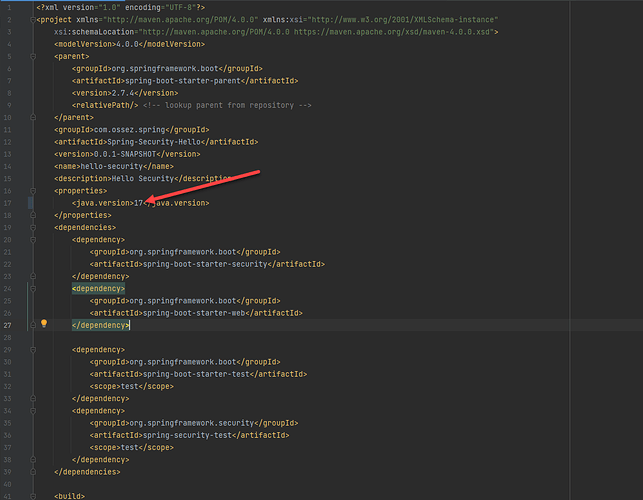
本文章对如何快速启动一个 启动 Hello Spring Security Boot 应用进行说明。 下载代码 在这个项目中,使用的是 spring.io 的项目生成程序,生成的地址为:https://start.spring.io/starter.zip?type=maven-project&language=java&packaging=jar&jvmVersion=1.8&groupId=example&artifactId=hello-security&name=hello-security&description=Hello%20Security&packageName=example.hello-security&dependencies=web,security 当你双击上面的生产地址,你的浏览器将会访问 Spring.io 的网站,然后从这个网站上生产一个 zip 包下载。 为了方便我们查看代码,我们也将生成的 zip 包上传到我们的代码库中了,地址为:https://src.ossez.com/Cwikius-Spring/Spring-Security-Hello 编译 将所有的内容解压后放到本地,然后使用 IDEA 导入。 当导入成功后应该是没有问题完成编译的。 需要注意的是,有可能你的 JDK 需要安装 17 的版本,因为 Spring 的最新版本需要 JDK 17 了。 如果你的 JDK 版本为 11 的话,你可以在这里直接修改为 11 也是可以运行的。 运行 这个项目非常简单,只有一个可运行类,直接单击这个类右键运行即可。 在 IDEA 的控制台上,你可以看到生成的密码。 当然你也可以按照官方提示中使用 mvn 的运行方式。 运行生成的密码如下。 测试 通过浏览器访问 8080 端口 用户名为:user 密码为控制台生成的密码。 如一切正确,你的系统将会允许你进行登录,至此,我们完成了第一个 Spring Security 项目的运行。 登录后的界面会显示一个错误提示的空白界面,这是因为我们没有为这个项目定义 index 页面的内容。 如果输入的用户名和密码不正确的话,你将会在网页上得到错误的提示。 https://www.ossez.com/t/hello-spring-security-boot/14119
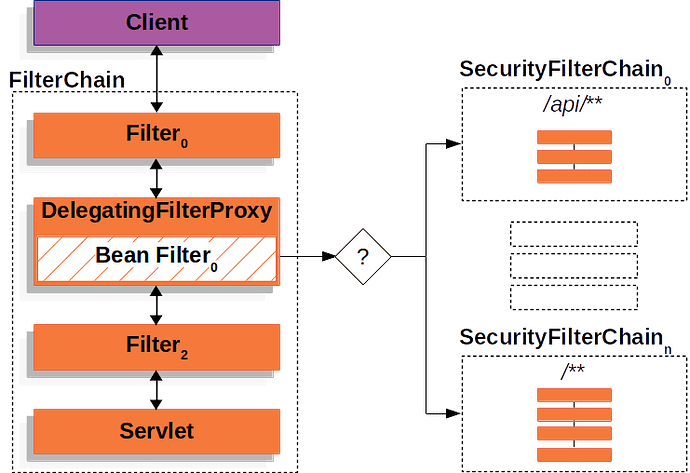
Spring Security 使用标准的 Servlet 过滤器(Filter) 并与 Servlet 容器集成。 这个意味着 Spring Security 可以在任何运行运行在 Servlet 容器(Servlet Container)中的应用上使用。 更具体地说,你可以不使用 Spring,而是基于 Servlet 的应用程序中使用 Spring Security。 因为我们都知道,Spring 是可以通过 Spring Boot 启动的,实际上启动的时候 Spring 也会启动一个嵌入式 Tomcat。 Spring Security 的这种设计意味着,我们可以不使用 Spring Boot 启动的容器,而直接使用一个 Tomcat 容器。 开发过 J2EE 项目或者 Spring 项目的都明白,使用 Servlet 对访问进行处理最重要的部分就是过滤器,通常过滤器也会让你很惆怅,配置不好的话,过滤器就会把请求过滤掉。 Spring Security 就是作用在过滤器上的,对 Servlet 过滤器有所了解的话,能更有效的帮助理解 Spring Security。 https://www.ossez.com/t/spring-security-servlet/14118
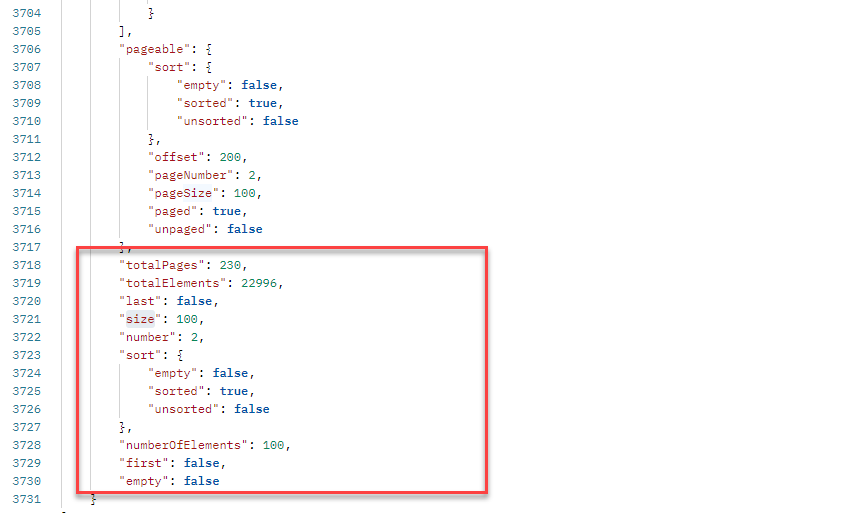
只要涉及到数据查询,通常我们都会进行分页查询。 假设你的表中有上百万条记录,不分页的话,我们不可能一次性将所有数据全部都载入到前端吧,那前后端都早就崩溃了。 结合 Spring Spring 和 Vue 都提供了开箱即用的分页功能。 Spring 主要用来处理后端的分页查询,VUE 主要在前端展示页面和进行下一个页面的查询。 有关后端 Spring 如何进行分页查询的方法,请参考:Spring Data @Repository 的分页查询 中的文章。 如果你配置得当,Spring 会将整个查询的页面信息发送给前端。 比如我们说的这一部分,在这部分中,我们会知道总共查询的记录有多少,每一页的大小,一共有多少页,当前是第几页等分页最重要的信息。 VUE VUE 的前端可以用 Pagination 这个组件 Pagination | Components | BootstrapVue 我们直接在前端调用模板,将参数设置进来就完成了。 代码可以精简到只有下面几句话: <b-pagination v-model="pagedData.number" :total-rows="pagedData.totalElements" :per-page="pagedData.size" @click="pageSearch(pagedData.number -1)" class="pagination pagination-rounded justify-content-end mb-2" ></b-pagination> 不用重复做无用的事情了。 第一个参数是当前的页面是第几页。 第二个参数为一共有多少条记录。 第三个参数为当前分页的页面大小。 第四个参数为,如果页码被单击了,我们会触发一个什么样的函数,通常这个函数就是通过 AJAX 的调用到后台再获取一次数据。 是不是简单到令人发指。 如果没有这个模板的话,我们需要手写分页,还要算页面编码,真心没必要。 如果想使用不同的 CSS 的话,在分页模板中加入自己的 CSS 就可以了。 我们的分页效果为 页面看起来还非常干净喔。 https://www.ossez.com/t/vue/14117
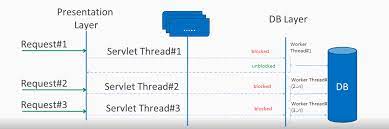
最近在看看 Spring Security 中的内容。看到了下面一段话,还挺拗口的。 Spring Security 提供了一个 验证(authentication), 授权(authorization),和保护常见攻击 的框架。 Spring security 是一个强大的,并且可以高度定制的身份验证和访问控制框架,能够同时支持 imperative 和 reactive应用, Spring security 已经成为保护 Spring 应用实事上的标准。 有关完整的特性列表,请参考本参考指南中有关特性(Features) 部分的内容。 如果你已经开始准备对你的应用程序进行安全限制,请参考针对servle和 reactive 部分的内容。 解释 这里,提到了 2 个概念 servlet 和 reactive。Spring WebFlux 是 Spring Framework 5.0 中引入的新的响应式web框架。 与Spring MVC不同,它不需要Servlet API,是完全异步且非阻塞的,并且通过 Reactor 项目实现了 Reactive Streams 规范。 可以理解,servlet 和 reactive 是 2 个不同的处理方式,通常 MVC 模式是使用 servlet 的。reactive 是响应式,也可以说是反应式,主要特点就是异步处理,是基于 Spring WebFlux 框架的。 我们常用的 Spring 编程大部分人都应该使用的是 MVC 模式吧。 简单点来说就是 Spring 或者应用服务器会针对你的每一次访问创建一个线程,这个线程是阻塞的。 考虑一个应用场景就是上传一个 N 大文件的的情况,这个是不是因为线程的阻塞导致了系统资源的浪费,那我们想,能不能针对高 IO 的情况,我们使用异步线程或者其他方式。 Spring 提供了一个异步的方式,但是针对高 IO 的情况可能更多使用的是 WebFlux。 Spring Security 为这 2 种相应访问请求的方式来配置安全性。 这就是在 Spring Security 文档中说的 reactive 。 其实早在去年,就有过这么一次面试: 北美亚特兰大一金融服务公司面试总结 ,但因为这响应式 Web 框架实在是应用场景不多,通常不是 Spring 框架实际使用的重点。 https://www.ossez.com/t/spring-security-servlet-reactive/14116
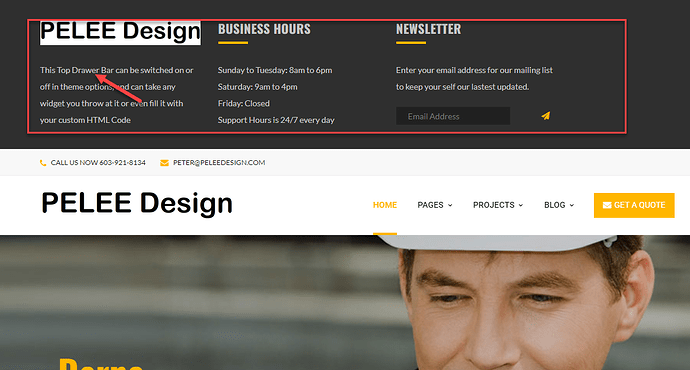
想了解这个主题选项在那里修改的。 指南 根据在后端的查找,没有找到一个可以一键关闭的地方。 但是这里面的内容是可以修改的。 选择左侧主题中的 Widgets。 然后打开 Widgets 中的 Top Drawer 然后可以对内部的内容进行修改。 修改完成后,单击右上角的更新就可以了。 然后刷新页面就可以看到首页上面的内容被修改了。 https://www.ossez.com/t/wordpress-top-drawer-bar/14115

WordPress 如何对动态循环页面进行修改? 修改方法 进入后台,找到页面,在我们需要修改的页面中,我们会看到这个动态循环页面使用的是: Revolution Slider 插件。 将鼠标移动到这个插件上,然后单击上面的笔的标记可以对插件进行修改。 打开这个插件,我们会看到这个插件使用的是配置 Home 1。 找到插件 在左侧的菜单中,选择 Slider Revolution 这个插件。 然后找到我们需要修改的 Home 1 的主题,在这个主题上选择上面的铅笔标记。 WordPress 将会打开一个编辑界面。 在这个编辑页面中可以对图片上的文字进行修改。 至于背景图的修改,可以通过在打开的编辑页面中选择上面的 Slides 来进行修改。 在这里可以添加背景图片,删除背景图片等操作。 图片的位置是存储在媒体库中的,可以将图片做好后上传到媒体库。 https://www.ossez.com/t/wordpress-revolution-slider-settings/14114