
旅行证到手后,就是定机票了。 定了机票发现最便宜的还是日本转机,想着那就办个日本签证吧,省得到时候想出去出去,又出乱子。 日本波士顿领事馆的官方网站地址为:Visa FAQ's | Consulate-General of Japan in Boston 说心里话,上面的内容有点乱,通常找到不真正需要的东西。 领事馆划分 日本在美国的领事馆是比较严格按区来的。 波士顿领事馆主要负责:下面几个州的,如果你不是这几个州的申请基本会被拒绝。 领事馆地址 领事馆的地址为: Consulate-General of Japan in Boston 6th Floor, 100 High Street, Boston, MA 02110 TEL:617-973-9772,FAX:617-542-1329 在领事馆的官网上能查到,貌似不需要预约,直接带着材料去就好了。 需要的材料 这个就是最郁闷的,上面的领事馆网站上没有对需要的材料进行明确的说明,也没有 Check List。 也就根据网站考古来的材料,并且加上自己经验了。 签证申请表 签证申请表有官方模板的,可以在网页上找到,自行下载填写,同时还有中文版的,如果英文不好的,也可以对着填写。 官方网站地址为:VISA | Ministry of Foreign Affairs of Japan 现在,下载下来是这样的。 内容不多,只有 2 页。 比较不开心的是,这个 PDF 文件你只能修改内容,然后打印,你不能把这个文件保存为 PDF,然后再重新修改。 如果你发现有写错的,就要重新再写一次了。 日本签证申请表.pdf (267.2 KB) 和美国签证比起来要填的东西少多了,就按照上面的要求填就好了。 其他基本材料 下面的这些签证材料是必须的,要不然就会被退回,直到你准备好。 护照 签证费 (具体要多少网上可以查,貌似是 50 多?到时候去签证的时候带个现金过去就好了。) 一张 2×2 的证件照 收入证明 居住文件证明 机票信息 说明: 居住文件证明(必须) 收入和居住证明我们准备就打印一张银行账号的对账单就好了,想是主要是为了证明申请人有足够的收入和经济来源吧。 如果有绿卡的话,应该是需要绿卡的复印件,也不是非常清楚,先复印了再说,带过去,省得到时候到处找复印机。 如果你是其他的身份,比如说学生,我觉得 I-20 和 美国签证是必须的,应该是需要复印的。 行程计划单(必须) 行程单也没有,其实主要目的是因为机票是日本经停的,怕万一要入境什么的麻烦。 第一次去波士顿日本领事馆的时候,这个行程计划单是必须要要的,哪怕是照抄别人的也得要一个。 波士顿领事馆给了一个行程单的模板,照着上面填就好了:波士顿日本签证的行程单 机票预订信息(必须) 机票预订信息是必须要要的,你可以不用出票。 按照现在的情况,通常 24 小时内退票是全额退票的。 这里的机票信息要求比较严格,必须是要往返的机票,中转票是不可以的。 第二次去的时候,我带的机票是中转的,是从 EWR-NRT-HKG 这样的机票,想是中途入境玩一下,在日本领事馆申请的时候,这个机票他们不同意。 他们要求的是机票必须是往返的,比如说你是 EWR-NRT-EWR 这种,或者是在日本换机场也是可以的比,必须就是从哪里来回哪里去。 解释为什么要申请 5 年签证(不是必须) 说是需要解释为什么要申请 5 年之类的,我是实在没有时间去写那么详细的内容。 就先不写吧,回头说缺材料了再说。 常见问题 下面对我们这次签证时候遇到的问题进行一些总结: 日本签证可以代办吗 简单回答是: 可以代办,但是你需要填写一个授权表,具体请参考:日本签证可以代办吗 波士顿领事馆停车 波士顿领事馆的那个地方实在是不好停车,哪怕就是停地下车库里面也得绕一下。 如果不着急的话,可以停稍微远点的地方。 就从这个正门进去,直接上 6 楼。 别忘记带美国 ID 在所有材料都准备好以后,领事馆工作人员问还有没有美国的 ID。 我就把我的 ID 给他们了,他们复印我的 ID。 如果你有美国驾照的话,也记得带上,不知道什么时候就要了。 踩坑实录 日本签证虽然整体来说还是比较好办的,但是我还是踩坑了好几次。 主要出问题的地方就是行程和机票。 第 1 次踩坑 没有带机票信息和填写行程单,被要求提交机票信息和行程单才可以办理。 第 2 次踩坑 拿的机票是中转机票,因为这个机票早就买好了,想着就用一下就好了。 被要求说这个机票是不可以的,必须使用的是完整的往返机票才可以。 本来我们想着也是中转的时候去日本玩一下,貌似这种方式去申请日本签证是不行的。只能是回去后重新去买个可以退票的机票了。 办结 可能是因为没有说明需要申请多年多次的签证。 这次办下来的是单次入境许可的签证,感觉还是有一点点失望。 但是想想也正常,没有准备说明文件为什么要办理多次入境签证,准备材料也是比较马马虎虎的。 然后就给了一个上面的取件单,貌似如果要求邮寄的话也是可以的。 签证费只收现金。 最后再拍一张日本住波士顿领事馆的照片吧,证明来过。 https://www.isharkfly.com/t/topic/265

波士顿日本签证的授权书。 如果你希望别人帮你代办,或者家人代办的话,你可以使用下面的授权书。 下面的授权书是波士顿住日本领事馆给的。 自己直接填好给代办人就行了。 https://www.isharkfly.com/t/topic/437

下面的表格是在波士顿办理日本签证的时候要求填写的行程单。 主要是酒店信息和电话号码。 酒店不需要预定,只要你有预定成功的往返机票就可以了,酒店信息就根据你要参观的景点附近 Google 下,找一个就好了。 但是机票是需要预定的,好在美国航空公司有 24 小时弹性退票制度。 定了机票,然后在 24 小时内退掉就可以了。 https://www.isharkfly.com/t/topic/438
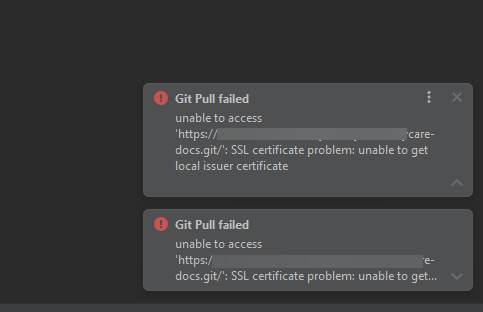
最近公司电脑升级后又抽风了。 在访问 Git 的时候提示了证书签名错误。 主要提示的错误为: git.exe fetch -v --progress "origin" fatal: unable to access 'https://src.ossez.com/yhu-docs.git/': SSL certificate problem: unable to get local issuer certificate git did not exit cleanly (exit code 128) (812 ms @ 5/12/2023 9:01:11 AM) 问题和原因 上面的原因文字上说是因为证书签名的问题。 我们实际访问的时候,就是公司的电脑上面有问题。 原因是公司电脑使用了一个安全工具,这个安全工具进行自签名,把访问外部网络的证书都自签名了,但是有些 CA 又不被这个自签名工具来信任。 所以唯一的办法就是跳过 https 的校验。 系统当前用户 下面这行命令的影响范围是系统当前用户。 需要注意的是,你如果没有系统的 Admin 管理员权限的话,下面这条命令会提示无权限。 git config --system http.sslverify false 全局所有用户 可以运行下面的命令,这个命令是针对全局的所有用户的,通常这个会在 Git 的进程中使用。 如果你没有管理员权限,这条命令应该也是可以执行成功的。 git config --global http.sslverify false 针对当前仓库 使用下面的命令是针对当前仓库的。 进入当前仓库的地址,然后运行下面的命令: git config http.sslverify false 如果打开仓库的配置文件的话,我们可以看到上面的仓库配置文件只是在配置文件中添加了下面的一段话。 也可以直接打开配置文件来修改。 https://www.ossez.com/t/git/14418

概述 在本文章中,我们对如何在 Java 中对 Array 和 Set 进行转换进行一些说明和示例。 这些示例通过使用 Core Java 和一些第三方的转换工具,例如 Guava 和 Apache Commons Collections。 更多有关的文章,请访问:Java - OSSEZ 相关的内容和参与讨论。 从 List 转换为 Set 使用原生 Java 代码 让我们首先来看看如何在原生 Java 中把数组转换为 Set。 通过下面的代码,我们了解到首先需要把 Array 转换为 List,然后再把这个 List 转换为 Set。 @Test public void givenUsingCoreJavaV1_whenArrayConvertedToSet_thenCorrect() { Integer[] sourceArray = { 0, 1, 2, 3, 4, 5 }; Set<Integer> targetSet = new HashSet<Integer>(Arrays.asList(sourceArray)); } 可选的,我们可以首先定义一个 Set 对象,然后把这个 Set 对象的元素进行填充: @Test public void givenUsingCoreJavaV2_whenArrayConvertedToSet_thenCorrect() { Integer[] sourceArray = { 0, 1, 2, 3, 4, 5 }; Set<Integer> targetSet = new HashSet<Integer>(); Collections.addAll(targetSet, sourceArray); } 使用 Guava 我们可以使用 Guava 转换工具来把数组给出的数组来进行初始化。 @Test public void givenUsingGuava_whenArrayConvertedToSet_thenCorrect() { Integer[] sourceArray = { 0, 1, 2, 3, 4, 5 }; Set<Integer> targetSet = Sets.newHashSet(sourceArray); } 使用 Apache Commons Collections 最后我们可以使用 Apache 的 Commons Collection 的库来进行处理。 这个处理方法和我们使用原生 Java 代码差不多,首先需要对 Set 进行初始化,然后再把 Set 中的元素进行填充。 @Test public void givenUsingCommonsCollections_whenArrayConvertedToSet_thenCorrect() { Integer[] sourceArray = { 0, 1, 2, 3, 4, 5 }; Set<Integer> targetSet = new HashSet<>(6); CollectionUtils.addAll(targetSet, sourceArray); } 从 Set 转换为 Array 使用原生 Java Set 中有一个 toArray 的方法,你可以直接使用这个方法来把给出的 Set 转换为 Array。 @Test public void givenUsingCoreJava_whenSetConvertedToArray_thenCorrect() { Set<Integer> sourceSet = Sets.newHashSet(0, 1, 2, 3, 4, 5); Integer[] targetArray = sourceSet.toArray(new Integer[0]); } 需要注意的是,我们在这里使用了 toArray(new T[0]) 来对变量进行初始化,相对使用 toArray(new T[size]) 这个方法。 使用 toArray(new T[0]) 来对数组进行初始化更加安全,快速,易读。 使用 Guava 下一步,让我们来使用 Guava 的 API 来进行转换。 @Test public void givenUsingGuava_whenSetConvertedToArray_thenCorrect() { Set<Integer> sourceSet = Sets.newHashSet(0, 1, 2, 3, 4, 5); int[] targetArray = Ints.toArray(sourceSet); } Ints 中有一个 toArray 的方法,这个方法将会把整数类型的 List 转换为 Array。 需要注意的是 Ints 的类型需要和数组中的类型进行匹配才可以。 结论 在 Java 的集合类型直接进行转换是我们需要经常进行操作的方法和需求。 Guava 的方法 Sets 中通常能够对 Set 进行比较好的操作,包括对 Set 的对象进行初始化。 我们可以用这个对象中的初始化参数来对数组转换为 Set。 使用 Commons Collections 还是有点晦涩。 https://www.ossez.com/t/java-array-set/14417
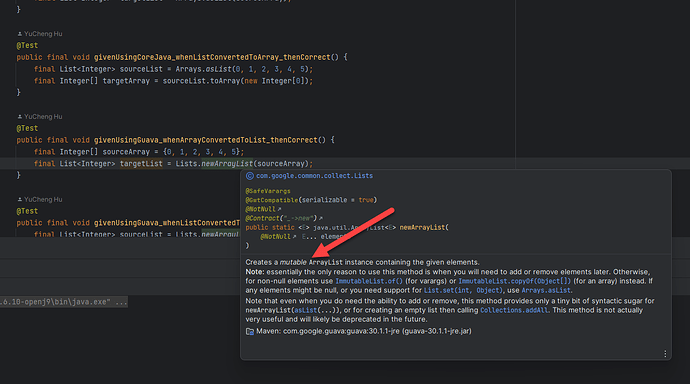
概述 在本文章中,我们对如何在 Java 中对 Array 和 List 进行转换进行一些说明和示例。 这些示例通过使用 Core Java 和一些第三方的转换工具,例如 Guava 和 Apache Commons Collections。 更多有关的文章,请访问:Java - OSSEZ 相关的内容和参与讨论。 从 List 转换为 Array 使用原生 Java 代码 我们可以使用原生 Java 代码来进行转换,在 List 中有一个 toArray 的方法,直接使用就可以了。 @Test public final void givenUsingCoreJava_whenListConvertedToArray_thenCorrect() { final List<Integer> sourceList = Arrays.asList(0, 1, 2, 3, 4, 5); final Integer[] targetArray = sourceList.toArray(new Integer[0]); } 需要注意的是,我们在这里使用了 toArray(new T[0]) 来对变量进行初始化,相对使用 toArray(new T[size]) 这个方法。 使用 toArray(new T[0]) 来对数组进行初始化更加安全,快速,易读。 使用 Guava 让我们来使用 Guava API 来进行相同的转换: @Test public final void givenUsingGuava_whenListConvertedToArray_thenCorrect() { final List<Integer> sourceList = Lists.newArrayList(0, 1, 2, 3, 4, 5); final int[] targetArray = Ints.toArray(sourceList); } Ints 中有一个 toArray 的方法,这个方法将会把整数类型的 List 转换为 Array。 把 Array 转换为 List 使用原生 Java 让我们使用原生的 Java 来把数组转换为 List。 直接只用 JDK 中的 Arrays 来进行转换就可以了。 @Test public void givenUsingCoreJava_whenArrayConvertedToList_thenCorrect() { Integer[] sourceArray = { 0, 1, 2, 3, 4, 5 }; List<Integer> targetList = Arrays.asList(sourceArray); } 需要注意的是,这个方法转换的 List 是固定长度的 List,你就没有办法对这个 List 进行相关操作了。 如果你是希望使用基本的 ArrayList 的话,我们可以简单的使用 ArrayList 来对其进行实例化。 如下面的代码来进行实例化: List<Integer> targetList = new ArrayList<Integer>(Arrays.asList(sourceArray)); 使用 Guava 让我们来使用 Guava API 来进行相同的转换: @Test public void givenUsingGuava_whenArrayConvertedToList_thenCorrect() { Integer[] sourceArray = { 0, 1, 2, 3, 4, 5 }; List<Integer> targetList = Lists.newArrayList(sourceArray); } 使用 Commons 集合 最后,我们来看看如何使用 Apache Commons Collections 的 CollectionUtils.addAll API 来把 Array 的内容填充到一个空的 List: @Test public void givenUsingCommonsCollections_whenArrayConvertedToList_thenCorrect() { Integer[] sourceArray = { 0, 1, 2, 3, 4, 5 }; List<Integer> targetList = new ArrayList<>(6); CollectionUtils.addAll(targetList, sourceArray); } 这个方法,我们使用的是 CollectionUtils 的工具类来进行添加的。 结论 在 Java 的集合类型直接进行转换是我们需要经常进行操作的方法和需求。 上面介绍了几种基本的转换方法,根据我们的实际使用经验,使用 Guava 的 Lists 来把 Array 转换为 List 是我们常用的方法。并且创建的 List 也是可变的。 使用 Commons Collections 的这个方法是通过 Add 的方法的,感觉这个方法也比较简单,但是用得有点晦涩。 https://www.ossez.com/t/java-array-list/14416

英文是 Pressure Washer ,主要通过压力形成强力冲击力的水流,从而清理顽固污渍,常常用来洗车、清除后院和烧烤架的污渍等等。 组装也非常简答,按照说明书有个 10 多分钟就差不多了。 不需要有特殊的工具,最好还是有一个扳手。 使用 经过 1 天多的使用,发现性能还是比较稳定的。 感觉到是邮箱足够大,不需要频繁的加油,这个是比较大的优势。想想用到一半了没油了又到处找油还是挺麻烦和讨厌的。 启动 还没有达到没有一拉就启动的程度,通常能够正常在拉动 2 次的情况下启动起来。 启动后运行也比较稳定,当然如果水管中有空气的时候会出现一些停顿,应该是属于无水压保护的功能吧。 一旦运行起来后,就不需要过多的担心了。 个人还是比较喜欢使用燃油的高压水枪。 整体感觉是,比用电的高压水枪少一根线,运行范围更大,能够在更大的范围内移动。 水枪压力够大 3400PSI,通常能够适用大部分的使用场景。 https://www.isharkfly.com/t/topic/436
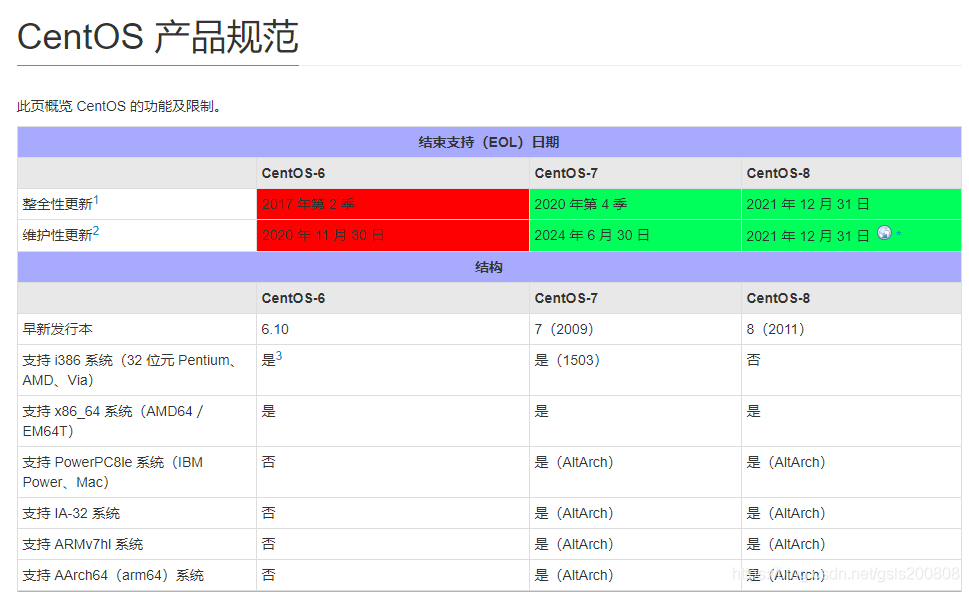
自 1994 年面世以来,红帽 Linux 已经陪伴开发者们走过了将近 30 年的旅程。2014 年红帽吸纳了 CentOS 社区主要成员包括当时的项目领导者、核心项目贡献者。Red Hat 和 CentOS 项目联手,目的是开发用于企业 IT 的下一代 Linux 创新技术。这些年,我们看到开源模型继续蓬勃发展,推动了 Linux 容器、Kubernetes、微服务、无服务器等的兴起。 鉴于社区推动的创新步伐迅速,社区领导层在 2019 年决定向 CentOS Linux 社区引入一个新模式:CentOS Stream,将社区工作转向上游。CentOS Stream 是一个面向开发者的发行版,旨在帮助社区成员、红帽合作伙伴和其他人在更稳定和可预测的 Linux 生态系统中充分利用开源创新。 对最终用户影响最大的是 CentOS Linux 7 和 8 逐渐停止维护和更新。 CentOS操作系统 在众多的操作系统中,CentOS无疑是一个广泛被认知和被选择的操作系统,这和CentOS自身的特性以及国内运维团队发展有着不可分割的关系。 在国内互联网IT技术发展的初期,更轻量级的开发语言与中间件开始逐渐被IT人员选择,所以更适合运行这种环境的Linux操作系统被大家广泛用于服务端操作系统,在那个时期,国内的运维团队基本以Redhat为主,Redhat作为针对企业应用的Linux为了将性能最大化留给应用系统,基本是基于命令行进行管理,同时当时构建网站主流的apache、mysql等都有基于Redhat的优化版本。 在Redhat逐渐转向订阅级别的企业级操作系统后,Redhat Linux也从开源分化为面向企业的收费版本Redhat以及面向社区的免费版本Fedora。很多Redhat用户仍希望能免费使用曾经开源、稳定并带有支持的Redhat Linux,在这个背景下就诞生了CentOS。 Gregory Kurtzer创建了CentOS项目(全名是Community EnterpriseOperating System),CentOS项目的目标是在红帽不再提供免费的技术支持和产品后对红帽的重构,基于红帽的源代码对RHEL进行翻版,在重新编译的过程中去仅去除了RHEL源代码中红帽的LOGO、商标或者其他会可能会造成商业纠纷的部分并替换了主题。由于Redhat的知名度以及CentOS对自己发行版清晰的定位,所以CentOS一经发布就被众多红帽用户追捧。CentOS是一个完全非盈利性质的开源项目,而开源软件诞生的初衷之一是让那些用不起昂贵商业软件的人可以用上免费或者廉价的替代品,CentOS同时具备Redhat的稳定性以及免费特性,这也是CentOS在国内拥有大量用户的重要原因。 在2014年,CentOS宣布加入红帽,红帽出资对CentOS项目进行赞助,出人直接参与CentOS项目的开发,并占据了CentOS社区当时9个常任董事中3个名额。 CentOS加入红帽后完善了红帽的整个开源生态系统,最大的好处就是红帽所有产品对应的社区发行版本有一个比Fedora更理想的体验和开发平台,形成了完整的有一一对应关系的企业开源产品和社区开源产品。 Centos停止维护消息 2020年12月08日,CentOS官方宣布了停止维护CentOS Linux 8的计划,并推出了CentOS Stream项目。具体信息,请阅读CentOS官方公告。其具体规划如下: CentOS Linux 8作为RHEL 8的复刻版本,生命周期缩短,于2021年12月31日停止更新并停止维护(EOL)。 基于以上官方变更计划,CentOS Linux 8用户将无法获得包括问题修复和功能更新在内的任何软件维护和支持。CentOS官方建议停止维护后:对于开发或测试环境,可以将环境迁移至CentOS Stream版本; 对于生产环境或部署关键业务的系统,建议使用稳定的Red Hat Enterprise Linux。对此,用户需评估以下问题: CentOS Stream是一个滚动发行的版本,仅为RHEL前置测试版,运用于生产环境时,可能存在一定风险。 要不要升级 回答是要。 我们最近在部署 syslog-ng 的时候,发现 CentOS 因为停止更新了,所以 CA 证书也没有办法更新了。 本来我们本着就是能用就不升级的态度来做的,但是在遇到 CA 证书失败的情况下升级就是唯一的选择了。 停止更新后会造成更多的安全隐患,对部署在生产环境下使用的服务器是不利的。 https://www.ossez.com/t/2023-centos/14415

这龙虾也挺不容易的。 最后了还要有点仪式感。

Harbor Freight 这家店有点意思。 这家店感觉主要是卖工具的,但是和 Home depot 又没有那么全。 因割草机的轮胎已经坏掉了,需要买个撬棍换个轮胎什么的。 结果找来找去都没有找到需要的,反而在这家店里面发现了不少宝藏的好东西。 店不大,但是如果你是搞修理,修修车什么的,这里面的东西就比 Home Depot 要全一些。 https://www.isharkfly.com/t/harbor-freight/433