飞机上的规定都是血的教训来的规定的。 确定所有旅客上飞机的最大考虑就是安全了。目前航空公司规定的是行李和人须同时上飞机,当然也不绝对是这样的,有时候行李丢了,或者行李延误了,人走了,行李没走也是有可能的。具体航空公司怎么处理这个问题,不太清楚。 绝大部分情况下是人和行李需要同时上飞机,如果人已经过了安检了,机场是知道你过了安检的,这个时候行李就已经开始准备装飞机了。 还有个说法是飞机配重,貌似不是主要原因。 如果在你登机结束了,你还不在登机口,航空公司会去找你。主要原因是,如果你不上飞机,航空公司要把你行李找出来,然后从飞机上卸下来。同时因为你延误,航空公司还要安排下一班飞机让你走,有些公司可能要收费,或者要你重新买票,有些公司可能会直接送走你。 不管怎么样,对航空公司都是成本,所以航空公司会对过了安检或者准备安检的乘客在登机快结束之前进行广广播找你,在这里多花几分钟能避免不少问题和成本。如果你还没有过办票,行李没有交运的话,基本上不会找你。 换国际航班,这里成本更高,为了方便自己也方便别人,还是早点到机场吧,过了安检周边转转,别到处瞎跑就好了。 https://www.ossez.com/t/topic/772

如果就题目来说,明显是抄的话,肯定不能给,这个涉及到学术诚信问题。在美国大学只要涉及到学术诚信问题,基本上是一票否决,提供代码的和使用的人都会一并处理。 从实际上来说,其实大学学的那些算法和数据结构在具体的项目中用处真的不大,如果一个人用心花几周,基本上数据结构大学那些东西也能啃下得差不多,估计更多是题主担心自己的工作成果被无偿占用了。 其实也不是没有办法呀,GitHub 就很好呀,你的代码肯定要部署到一个地方,Git 呗,上面有推送记录,提交记录,你的修改记录,能够很好的证明这个是你的原创,如果你觉得面子上过不去,给个 Git 的仓库给他看看,然后说说这是 Team Work 啥的,就算找麻烦也找不到你。代码这东西,每一个人有每一个人的写法,定义不一样,有些人喜欢用 IF,甚至连方法命名都不一样,有些人喜欢用 int,有些人喜欢用 long,其实都是殊途同归。 保持一种开放心态吧,这种东西真的没有那么重要,开源世界不都是这样的吗? https://www.ossez.com/t/topic/771
有好几个办法可以做。 将数据转换为 CSV, 用处理 csv 来处理。 还有一个就是 Apache poi,请参考文章:Apache POI 读取 Microsoft Office Excel 文档 将数据先读到内存里面,然后用 hibernate 写个 ORM,或者你就处理文本,直接输出 SQL 呗。 将数据先读到内存里面是关键。 https://www.ossez.com/t/java-excel-mysql/770
用int 效率高,便于转换,便于国际化。 不管怎么样使用中文也好英文也罢,字符占用存储比 int 要多,中文更多了。int 数据库好索引,查询快。 国际化 字符 map 方便。 另外这个是大家都懂的定义,提高代码可读性。要知道你的代码有时候也是要给别人读的。有时候可能看起来不太好的,但是也都是习惯了,更多的惯例就是规定。 https://www.ossez.com/t/int/769
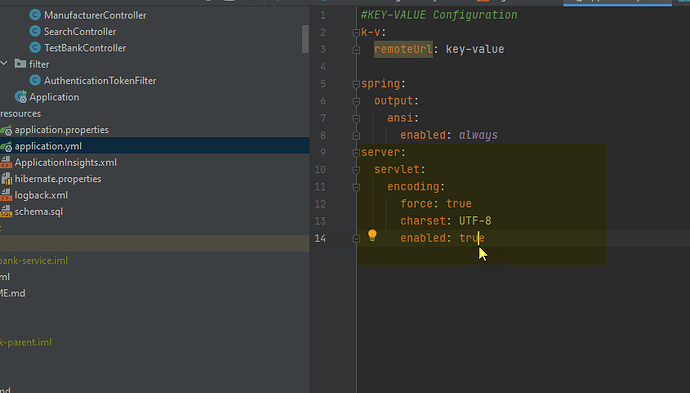
Spring Boot 在运行 API 的时候如果返回数据库的时候提示中文是乱码。 但是针对不同的浏览器,返回的结果是不一样的。 在 Application.yml 中 添加下面的配置: server: servlet: encoding: force: true charset: UTF-8 enabled: true 然后重新启动服务器后,我们所有的访问都会使用 UTF-8 编码。 这样以避免字符集错误。 需要注意的是,不同的浏览器对字符集的编码是不一样的,最好都测一下。 针对手机平台也是不一样的。 https://www.ossez.com/t/spring-boot-api/768
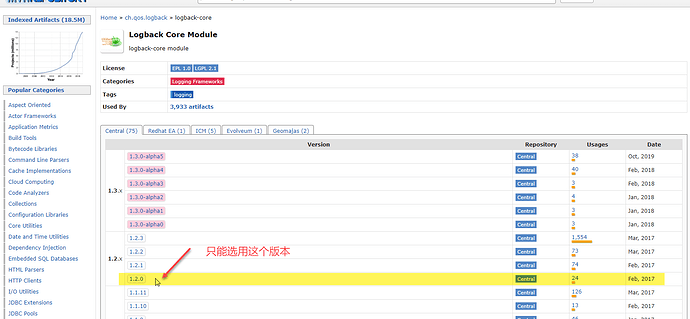
获得的错误信息为: Exception in thread "main" java.lang.IllegalStateException: Logback configuration error detected: ERROR in ch.qos.logback.core.joran.util.PropertySetter@34237b90 - A "net.logstash.logback.encoder.LogstashEncoder" object is not assignable to a "ch.qos.logback.core.Appender" variable. ERROR in ch.qos.logback.core.joran.util.PropertySetter@34237b90 - The class "ch.qos.logback.core.Appender" was loaded by ERROR in ch.qos.logback.core.joran.util.PropertySetter@34237b90 - [jdk.internal.loader.ClassLoaders$AppClassLoader@16f65612] whereas object of type ERROR in ch.qos.logback.core.joran.util.PropertySetter@34237b90 - "net.logstash.logback.encoder.LogstashEncoder" was loaded by [jdk.internal.loader.ClassLoaders$AppClassLoader@16f65612]. at org.springframework.boot.logging.logback.LogbackLoggingSystem.loadConfiguration(LogbackLoggingSystem.java:169) at org.springframework.boot.logging.logback.LogbackLoggingSystem.reinitialize(LogbackLoggingSystem.java:222) at org.springframework.boot.logging.AbstractLoggingSystem.initializeWithConventions(AbstractLoggingSystem.java:73) at org.springframework.boot.logging.AbstractLoggingSystem.initialize(AbstractLoggingSystem.java:60) at org.springframework.boot.logging.logback.LogbackLoggingSystem.initialize(LogbackLoggingSystem.java:118) at org.springframework.boot.context.logging.LoggingApplicationListener.initializeSystem(LoggingApplicationListener.java:306) at org.springframework.boot.context.logging.LoggingApplicationListener.initialize(LoggingApplicationListener.java:281) at org.springframework.boot.context.logging.LoggingApplicationListener.onApplicationEnvironmentPreparedEvent(LoggingApplicationListener.java:239) at org.springframework.boot.context.logging.LoggingApplicationListener.onApplicationEvent(LoggingApplicationListener.java:216) at org.springframework.context.event.SimpleApplicationEventMulticaster.doInvokeListener(SimpleApplicationEventMulticaster.java:172) at org.springframework.context.event.SimpleApplicationEventMulticaster.invokeListener(SimpleApplicationEventMulticaster.java:165) at org.springframework.context.event.SimpleApplicationEventMulticaster.multicastEvent(SimpleApplicationEventMulticaster.java:139) at org.springframework.context.event.SimpleApplicationEventMulticaster.multicastEvent(SimpleApplicationEventMulticaster.java:127) at org.springframework.boot.context.event.EventPublishingRunListener.environmentPrepared(EventPublishingRunListener.java:80) at org.springframework.boot.SpringApplicationRunListeners.environmentPrepared(SpringApplicationRunListeners.java:53) at org.springframework.boot.SpringApplication.prepareEnvironment(SpringApplication.java:345) at org.springframework.boot.SpringApplication.run(SpringApplication.java:308) at org.springframework.boot.SpringApplication.run(SpringApplication.java:1237) at org.springframework.boot.SpringApplication.run(SpringApplication.java:1226) at com.ossez.edtestbank.service.Application.main(Application.java:44) 问题和解决 这个是包的兼容性问题。 logback-core 需要设置为 1.2.0 版本,如果你设置了更高的版本的话,你就会遇到上面的问题。 请参考下面链接中的问题: https://jira.qos.ch/browse/LOGBACK-1326 貌似到现在还没有解决。 如果你还希望使用 logstash-logback-encoder 的话,那么需要将 logback 设置为 1.2.0 版本。 https://www.ossez.com/t/logstash-logback-encoder-logback/767
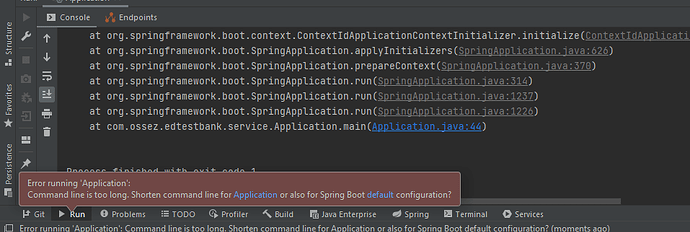
提示的错误信息如下: *Command line is too long*. Shorten *command line* for 解决办法 有下面 2 个方法都可以解决这个问题。 修改应用 首先需要选择 Application,然后选择编辑。 然后通过上面选择 JAR 的配置。 修改 workspace.xml 然后修改 workspace.xml 文件,针对 PropertiesComponent 组件,添加下面的参数: <property name="dynamic.classpath" value="true" /> 然后重新启动后就可以解决这个问题了。 https://www.ossez.com/t/spring-boot-intellij-command-line-is-too-long-shorten-command-line-for/763

你可能有下面的一些安装目录: /usr/lib/jenkins/:jenkins安装目录,WAR包会放在这里。 /etc/sysconfig/jenkins:jenkins配置文件,“端口”,“JENKINS_HOME”等都可以在这里配置。 /var/lib/jenkins/:默认的JENKINS_HOME。 /var/log/jenkins/jenkins.log:Jenkins日志文件。 https://www.ossez.com/t/jenkins-linux/762
Jenkins 的文件结构目录如下。 在 CentOS 8 的操作系统下,具体的路径是在 /var/lib 目录下的。 所有的配置文件都在这里,包括有你 Job,这是你的任务目录。 JENKINS_HOME +- config.xml (jenkins root configuration) +- *.xml (other site-wide configuration files) +- userContent (files in this directory will be served under your http://server/userContent/) +- fingerprints (stores fingerprint records) +- nodes (slave configurations) +- plugins (stores plugins) +- secrets (secretes needed when migrating credentials to other servers) +- workspace (working directory for the version control system) +- [JOBNAME] (sub directory for each job) +- jobs +- [JOBNAME] (sub directory for each job) +- config.xml (job configuration file) +- latest (symbolic link to the last successful build) +- builds +- [BUILD_ID] (for each build) +- build.xml (build result summary) +- log (log file) +- changelog.xml (change log) 具体的官方文档参考地址为:https://wiki.jenkins.io/display/JENKINS/Administering+Jenkins https://www.ossez.com/t/jenkins-centos-8/757
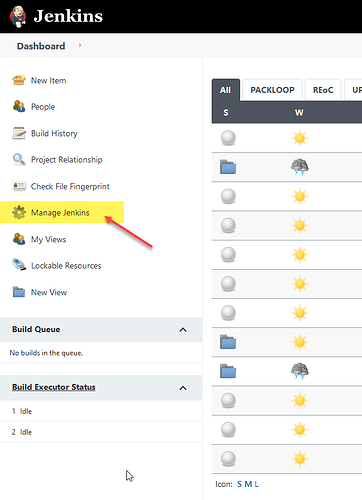
在使用 Jenkins 进行编译的时候提示错误: The JAVA_HOME environment variable is not defined correctly This environment variable is needed to run this program NB: JAVA_HOME should point to a JDK not a JRE 解决办法 在 Jenkins 中选择 Manage Jenkins,然后选择 配置系统. 配置系统 然后选择全局属性后,添加一个变量为 JAVA_HOME 就可以解决这个问题了。 然后再重新编译后就可以解决参数配置问题。 https://www.ossez.com/t/jenkins-java-home-environment/761